分类归档 客户故事

Avatar photo 通过Ethan Davis

Rita Vinieris × Fashion Diffusion AI: How a Bridal Brand Turns Sketches Into Photorealistic Gown Renderings

From hand-drawn sketch to photorealistic rendering — how one of North America’s most celebrated bridal designers brought AI into the heart of the creative process with Fashion Diffusion AI.

What Is Rita Vinieris?
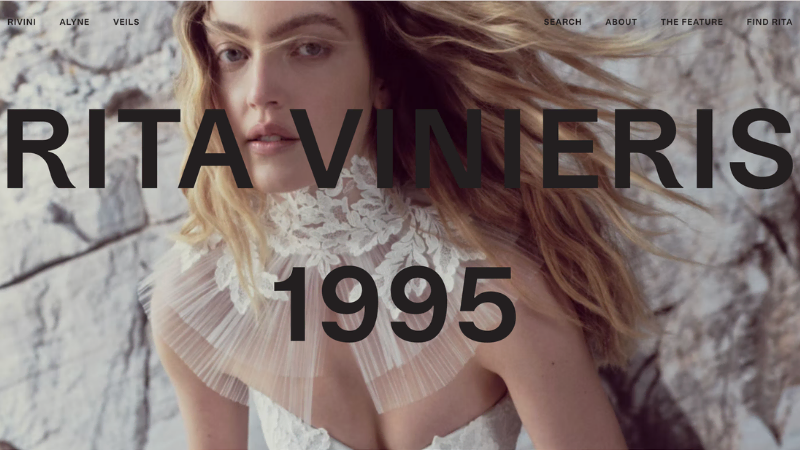
rita vinieris webshop

Rita Vinieris is a luxury bridal designer who launched her signature label Rivini in 1995. Over the past three decades, the brand has built a reputation as one of the most respected names in North American bridal fashion. The collection is presented seasonally at Bridal Fashion Week to international buyers and editors, and carried by leading bridal boutiques across North America.

Every Rita Vinieris gown begins as a hand drawing. The design process is rooted in couture tradition: sketches that capture silhouette, construction, and fabric intent before a single piece of cloth is cut. The collection is defined by fluid silhouettes, refined structure, and meticulous attention to detail — a design language that takes shape on paper long before it reaches the atelier floor.

The Challenge: The Gap Between a Sketch and a Finished Gown

In bridal fashion, the design process runs far ahead of production. A sketch approved today may not be sampled for weeks and not photographed for months. In the time between a designer drawing a gown and a bride seeing it in a boutique, the vision exists primarily on paper — and paper has limits.

Why Fashion Sketches Can’t Show How a Bridal Gown Really Looks

A hand-drawn sketch captures proportion, structure, and intent — but it is also an abstraction. It shows how a gown is constructed — not how it looks when light passes through layers of tulle. Not how hand-beaded lace reads at full scale. Not how a fluid silk charmeuse drapes when worn. For a designer like Rita Vinieris, whose work is defined by fabric behaviour and surface detail, that gap is where much of the creative judgment happens — and it has traditionally been bridged by experience alone.

Communicating Gown Intent to Buyers Without a Finished Sample

Bridal collections are presented to buyers before sampling is complete. The traditional tools — sketches, fabric swatches, mood boards — communicate well between experienced professionals, but leave much to interpretation. When a buyer needs to decide which fabric reads better at scale, or whether a structural detail resolves correctly at the neckline, the only reliable answer has traditionally been to make the sample. And samples take time and money.

Bridal Design Iteration Requires Costly Physical Prototypes

Bridal design involves significant iteration. A gown that looks right in sketch may need adjustment once the fabric is cut. A detail that works in one material may not translate to another. Each round of iteration traditionally requires a new physical prototype — a slow, expensive loop that constrains how many design directions a team can explore before committing to a final direction.

How Rita Vinieris Uses Fashion Diffusion AI in the Design Process

Rita Vinieris uses Fashion Diffusion AI’s Sketch to Render feature to convert hand-drawn design sketches into photorealistic gown renderings. This compresses the gap between a drawn concept and a finished visual — and enables design iteration without physical prototyping.

Sketch to Render — From Line Drawing to Photorealistic Gown

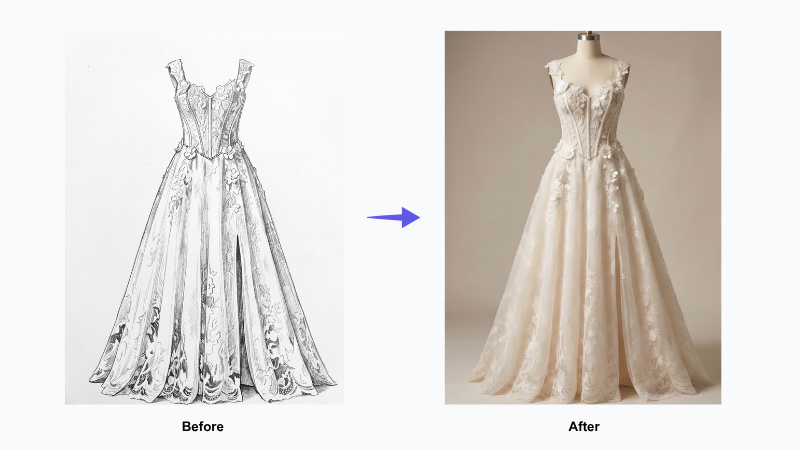
Sketch to Render takes a hand-drawn fashion sketch and generates a photorealistic rendering of the finished garment. Fabric texture, drape, surface detail, and light behaviour are all rendered from the original line drawing — producing an image that shows how the gown will actually look, not just how it is constructed.

For a bridal designer working in couture-level materials — silk organza, Chantilly lace, hand-beaded tulle — the ability to see fabric behaviour rendered accurately from a sketch changes what the design process can explore. Details that would previously require a physical sample to evaluate can be assessed visually before any fabric is cut.
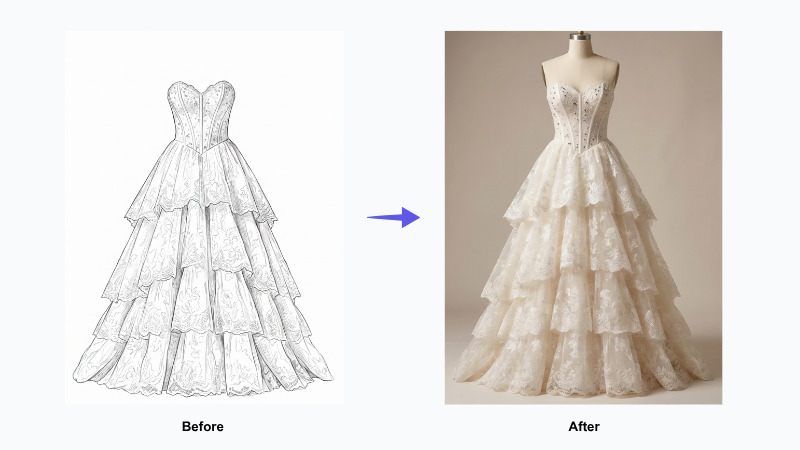
Wedding dress brands use the Sketch to Render tool to turn hand-drawn sketches into rendered photos

Visualising Design Decisions Before Committing to a Sample

In bridal design, many of the most consequential decisions happen before a sample is made. Which fabric reads better at full scale? How does a structural detail resolve at the neckline? Does a particular silhouette work in a heavy versus a light material? These are questions that experienced designers have traditionally answered through instinct — or by cutting a sample to find out.

Sketch to Render gives those decisions a visual anchor. A sketch rendered in the intended fabric shows how the gown will actually behave. The way a silk organza overlay diffuses light. The way a structured bodice holds its shape. The way a full skirt falls. Design choices that would otherwise wait for a physical prototype can be made earlier, with more visual information and less material waste.

Presenting the Collection Before Samples Are Ready

Bridal collections are shown to buyers at Bridal Fashion Week and in showroom appointments, often before physical samples are complete. A rendered image communicates silhouette, fabric choice, and styling direction with a precision that a sketch cannot. Buyers can assess a collection visually without projecting from a line drawing — and that confidence at the ordering stage reduces ambiguity between designer intent and buyer expectation.
Presenting the Collection Before Samples Are Ready

Strengthening the Custom Bridal Consultation

For brides commissioning custom or semi-custom gowns, the design conversation typically begins with sketches and fabric swatches — and asks a lot of the bride’s imagination. A rendered image of the proposed gown, in the intended fabric and silhouette, removes that ask. The bride sees how the gown will look, not just how it is constructed — and that clarity early in the process reduces revision cycles and builds confidence on both sides before the first fitting.
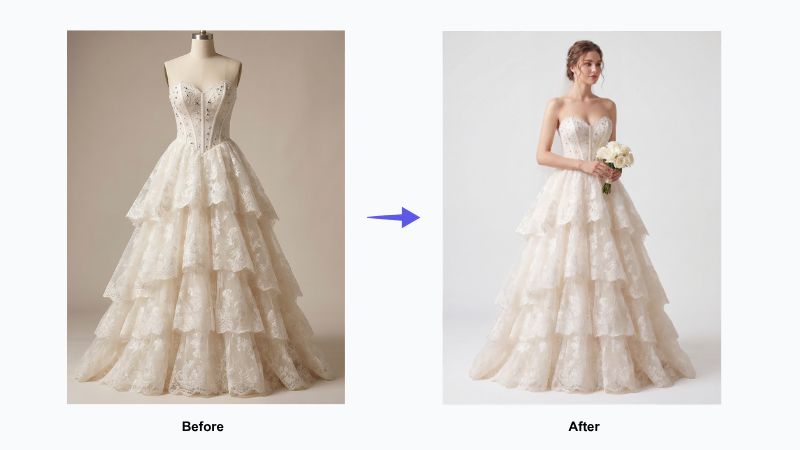
The bride can see how the wedding dress looks on model

Virtual Try-On — Showcase Finished Gowns on an AI Model Without a Studio Shoot

Once a gown moves from design into production, it needs to be shown on a body — for website listings, lookbooks, buyer presentations, and showroom materials. Traditional model photography requires studio booking, model fitting, and post-production before a single image is ready.

Virtual Try-On places a finished gown on a realistic AI model, generating on-model imagery without any of that overhead. For a bridal brand managing multiple collections and styles, this means product imagery can be produced and updated on demand — keeping every gown correctly represented across every channel, without waiting on a photography schedule.
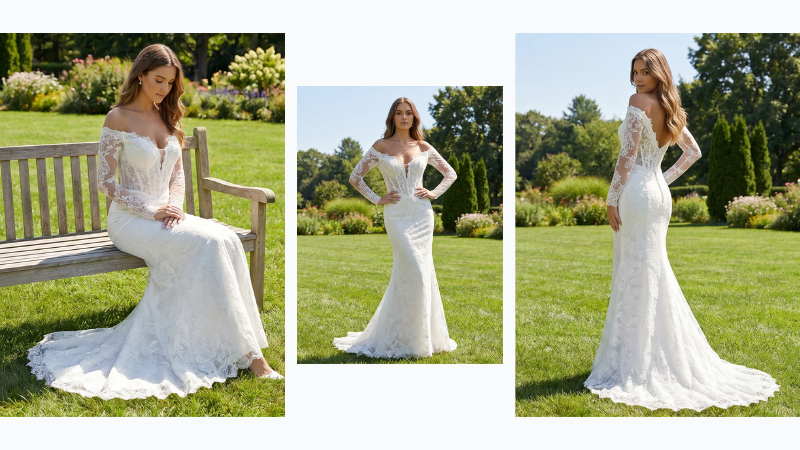
Virtual Try-On places a finished gown on a realistic AI model
Fashion Diffusion AI-generated

The Results: Faster Bridal Design Decisions, Fewer Physical Samples

The impact of Sketch to Render on a bridal design workflow is felt at two levels: within the creative process, and in how the collection is communicated externally.

More Design Directions Explored Before Production Begins

When rendering from a sketch takes minutes rather than days, the number of design directions a team can explore before committing to sampling increases significantly. Fabric choices, structural details, silhouette variations — each can be assessed visually without cutting a sample. The result is a more informed set of decisions entering production, and fewer costly revisions after the fact.

AI Rendering Aligns Design Intent Across Atelier, Buyers, and Brides

A photorealistic rendering communicates the designer’s intent with a precision that a sketch cannot. For the atelier team, the boutique buyers, and the bridal stylists working with clients — a rendered image removes ambiguity. Each party spends less time interpreting, and more time moving forward.

The best bridal design is already fully realised in the designer’s mind. Sketch to Render gives that vision somewhere to live before the fabric exists.

Fewer Physical Samples, Less Material Waste

Every sample that doesn’t need to be made represents fabric, labour, and time saved. When design decisions that previously required a physical prototype can be made from a rendered image, the number of samples needed to reach a final direction decreases. For luxury bridal brands working with expensive couture materials — silk, hand-beaded lace, layered organza — that reduction has a direct impact on both production costs and material waste. It is a more sustainable way to design, and a more economical one.

Bring AI Into Your Bridal Design Process

Rita Vinieris is one of a growing number of luxury bridal designers using Fashion Diffusion AI to accelerate the journey from sketch to finished visual.

If your design process starts with hand drawings and ends with couture gowns, Sketch to Render gives you a way to see the gown before it’s made. Iterate on the design before a single sample is cut. Once the gown is ready to be shown, Virtual Try-On places it on an AI model for on-demand product imagery. And Apply Fabric lets you visualise different fabric options on a finished silhouette.

Try Fashion Diffusion AI free →

Some details have been presented as representative of typical use patterns and may not reflect the full scope of Rita Vinieris’s operations. If you have questions about the content of this article or would like to clarify any information, please contact us at support@fashiondiffusion.ai.
Avatar photo 通过Sophia Mille

Lilla P × Fashion Diffusion AI: How to a Women’s Fashion Brand Turns On-Model Photos Into Flat Lay With AI

Your product photos are already an asset. Here’s how one contemporary women’s label used Fashion Diffusion AI to get more formats — and more value — out of photography it had already produced.

What Is Lilla P?

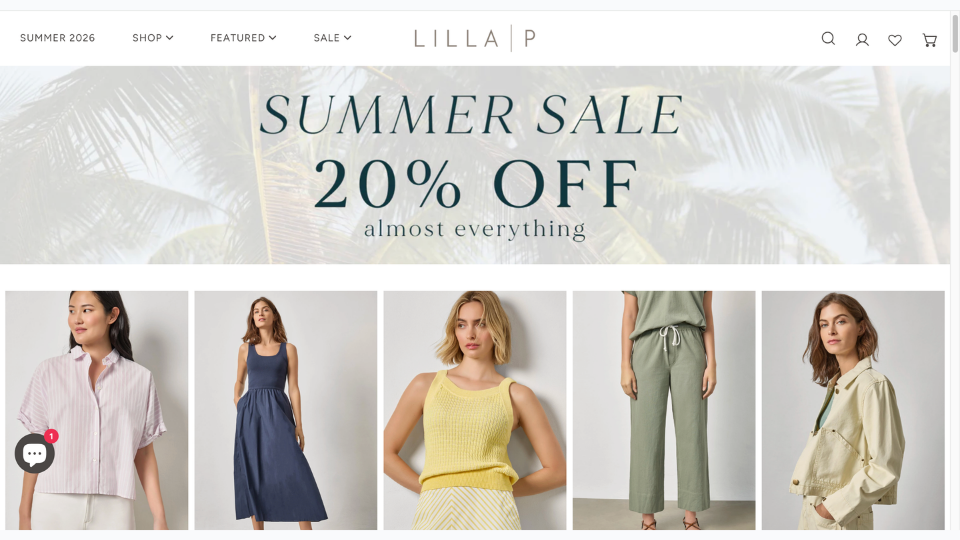
Lilla P webshop

Lilla P is a women’s fashion brand founded in New York in 1998. Built around elevated basics and relaxed contemporary styling — tops, knits, dresses, trousers, and outerwear — the brand has grown into a full seasonal collection with a loyal following across the US market.

Like most fashion brands at this stage, Lilla P produces regular product photography to support its seasonal catalog. Every new piece needs to be shot, edited, and made ready for use — a continuous production commitment that grows as the collection grows.

The Challenge: The Same Garment, Multiple Format Requirements

Product photography is not a one-size-fits-all deliverable. A single garment may need to appear in several different formats depending on how and where it is being presented — and not every format can be repurposed from another.

On-Model Photography Doesn’t Always Transfer

On-model photography is the standard format for direct-to-consumer channels. It shows the garment in context, on a body, in a way that helps customers understand fit, proportion, and styling. For a brand’s own webshop and marketing materials, it is the obvious choice.

On-model photography introduces more variables. The model, background, and styling can all affect consistency. This makes the images harder to reuse across different channels. When brands need a clean and neutral product image, on-model photos often need to be replaced instead of repurposed.

Flat Lay Photography Has Always Required a Separate Shoot — Until Now

Flat lay imagery — a clean, overhead photograph of the garment laid flat — is the format that removes those variables. The garment is the subject. Nothing else competes for attention. Fabric texture, construction detail, and silhouette are all clearly readable.

Historically, producing flat lay meant a separate shoot. Different setup, different lighting, different post-production requirements. For brands that need both formats across a full catalog, that has traditionally meant running two parallel production tracks — doubling the time and cost of imagery for every piece in the collection.

A Growing Catalog Makes the Problem Bigger

Lilla P releases new pieces continuously across the season. Every new arrival adds to the production queue. The broader the catalog, the more the dual-format requirement compounds — and the more pressure it puts on the team to keep imagery current without proportionally expanding the photography budget.

How Lilla P Uses Fashion Diffusion AI to Extend Its Photography

Lilla P uses a single Fashion Diffusion AI feature — the Flat Lay Generator — to derive flat lay imagery directly from existing product photography. It is a practical application of the broader shift toward AI-driven fashion workflows that allows brands to produce more from the assets they already have.

AI Flat Lay Generator — Convert Any Product Photo Into a Clean Flat Lay

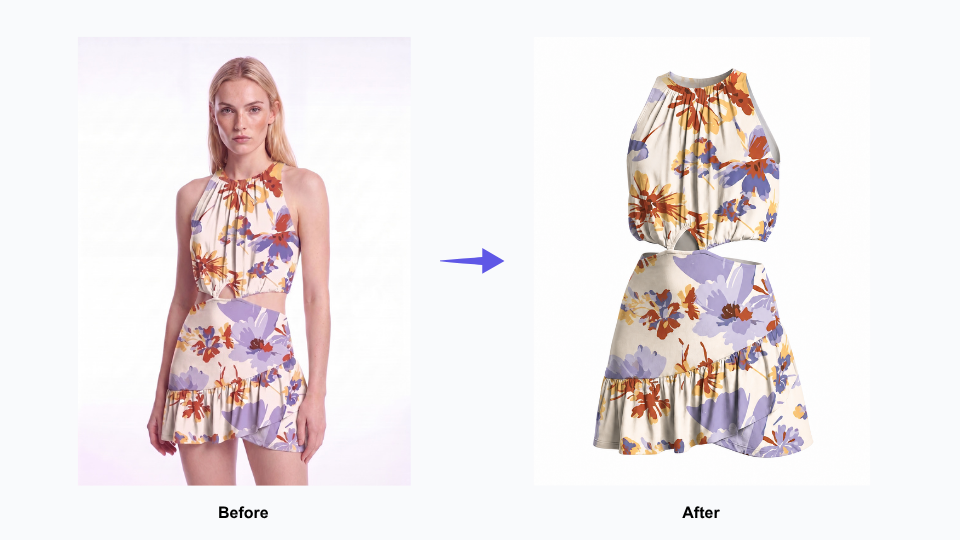
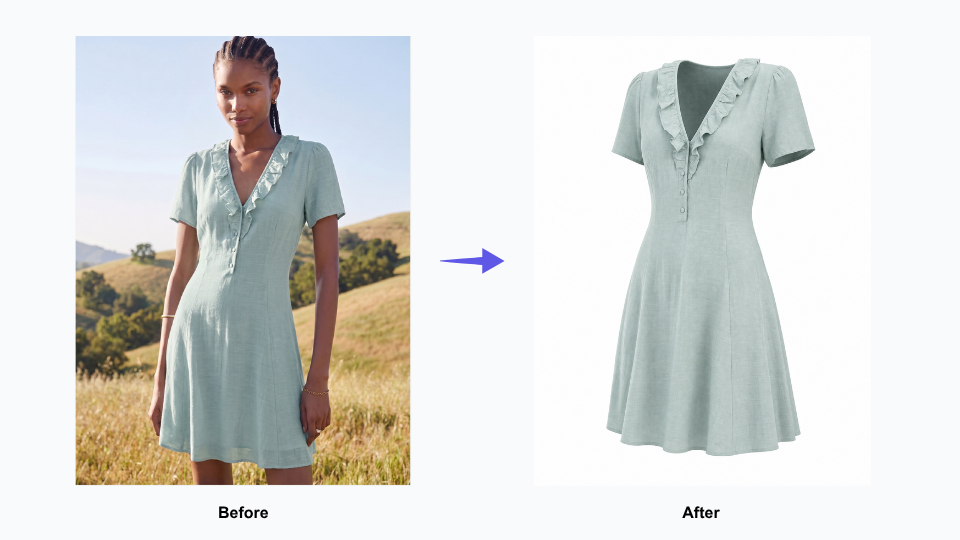
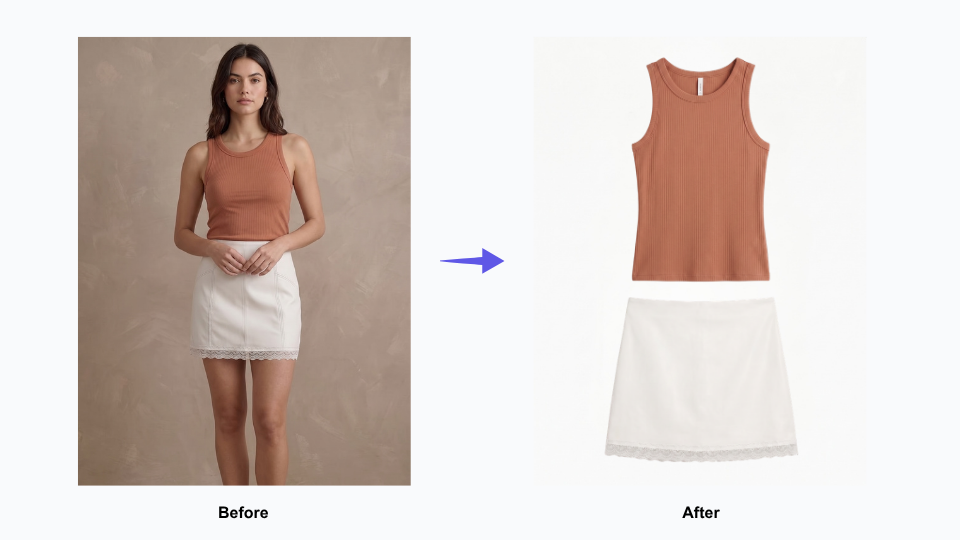
Flat Lay Generator takes an existing garment image — including on-model shots — and renders a clean, realistic flat lay version. Accurate fabric texture, clear construction detail, consistent presentation. The output reads as a purpose-shot flat lay, not a processed version of the original.

This is not background removal. It is not a crop. It is a generated flat lay built from an existing image — a new format derived from a source that already existed.

Flat Lay Generator — More Formats From Photography You Already Have

Before: Every Product Required Two Separate Photography Sessions

Previously, getting both an on-model image and a flat lay for the same piece meant two separate production sessions. Two different setups, two rounds of editing, twice the time per SKU. For a single garment, manageable. Across a full seasonal catalog, it adds up quickly — and creates a continuous scheduling dependency that slows down how fast new pieces can be fully ready.

The New Workflow: One Product Shoot, On-Model and Flat Lay Both Ready

Now, a garment gets photographed once. The flat lay version is generated from that same source image using the Flat Lay Generator. Both formats come from a single shoot, processed in sequence rather than in parallel — turning what used to be two separate production sessions into one continuous workflow.

Consistent Flat Lay Imagery Across Every Product Category

One practical advantage of AI-generated flat lay is consistency across different product types. A knit cardigan, a woven shirt, a structured jacket — each presents differently as a physical garment, and human photographers inevitably approach each one slightly differently. AI applies the same rendering logic to every piece, producing a consistent visual presentation across the full catalog.

For brands managing multiple product categories across every season, consistency matters. A cohesive image library makes every product feel connected. It creates a stronger brand identity, even when items were photographed at different times or in different formats.

Getting More From Photography Already Produced

The core outcome for Lilla P is straightforward: existing product photography now yields two usable formats instead of one.

Existing Product Photography Yields More Than One Format

Every on-model photograph in Lilla P’s archive is now a potential source for flat lay imagery. Photography that was produced for one purpose can serve a second purpose — without being reshot, restaged, or re-edited from scratch. The value of the original shoot extends beyond its original use.

New Arrivals Get Both Image Formats Ready at the Same Time

When flat lay is derived from on-model photography rather than shot separately, both formats are ready at the same time. New pieces don’t wait in a queue for a second production session. They move through the workflow once and come out ready for every context they need to appear in.

Fashion Catalog Management Gets Simpler as SKU Volume Grows

Eliminating a parallel production track doesn’t just save time on individual pieces — it reduces the coordination overhead that compounds across a full season. Fewer scheduling dependencies, fewer post-production queues, fewer handoffs between teams. As the catalog grows, the workflow stays manageable rather than becoming proportionally more complex.

Your product photography is already an investment. The question is how much you’re getting out of it — and whether the same image could be doing more than one job.

Generate 3D clothing images with Flat Lay Generator

Start Generating Flat Lay From Your Existing Product Photos

Lilla P is one of a growing number of fashion brands using Fashion Diffusion AI to extend the value of photography they have already produced.

If you have a catalog of on-model or hanging product shots and need clean flat lay versions, the Flat Lay Generator derives them directly — without a second shoot.

Pair it with Change Background to adapt the same imagery for different presentation contexts, or Upscale to bring generated assets to full web-ready resolution. For a broader view of how brands are rethinking their imagery workflows with AI, the Fashion Diffusion design guide covers the wider landscape.

Try Fashion Diffusion AI free →

Some details have been presented as representative of typical use patterns and may not reflect the full scope of Lilla P’s operations. If you have questions about the content of this article or would like to clarify any information, please contact us at support@fashiondiffusion.ai.
Avatar photo 通过Sophia Mille

Katherine Hooker × Fashion Diffusion AI: How a Luxury Coat Atelier Replaced Swatch Guesswork With AI Fabric Visualisation

From swatch books to instant visualisation — how one of London’s most celebrated custom outerwear designers brought the fabric selection process into the digital age with Fashion Diffusion AI.

What Is Katherine Hooker?

Katherine Hooker

Katherine Hooker London is a British luxury fashion house specialising in custom-made coats and jackets, handcrafted one at a time in an East London studio. The brand has built its reputation on exceptional natural materials — British wool, Italian cashmere, washed linen, and silk — sourced from small-batch mills and selected by hand each season. Every piece is cut and tailored by the same small team who have worked with Katherine for over twenty years. It is a brand defined by a timeless, fabric-led aesthetic — structured, considered, and built to last.

The business runs on consultation. Clients visit the studio or attend one of the brand’s trunk shows — held across the UK and the United States — where they choose from over 150 fabric swatches and work with the team to design a coat that reflects their personal style. There is no off-the-shelf equivalent. Each garment is made once, for one person, from first appointment to delivery in four to six weeks.

The Challenge: Clients Are Choosing a Fabric They Can’t Yet See on a Coat

The custom clothing process is built on trust. A client selects a style and a fabric, agrees on trimmings, and then waits four to six weeks for a garment they have never seen on a body. Unlike ready-to-wear, where a customer can see a garment on a body before buying, bespoke clients are committing to a finished piece they can only imagine. That gap between decision and delivery is where client uncertainty lives — and managing it is one of the central challenges of any made-to-order fashion business.

Clients Are Choosing a Fabric They Can't Yet See on a Coat

Fabric Is the Design — But a Swatch Can’t Show the Full Picture

At Katherine Hooker, fabric choice isn’t a finishing detail. It defines the entire character of a coat. A structured tweed reads formal and architectural. A draped cashmere feels entirely different on the body. A washed linen has its own weight and movement. None of that comes through in a swatch.

When a client is choosing between two similar fabrics — two wools, two tweeds — the decision often comes down to instinct rather than a clear visual reference. Some clients walk away confident. Others don’t, and that uncertainty sits with them for the full four to six weeks until their coat arrives.

Remote Clients Make High-Stakes Decisions Without Physical Reference

The challenge is sharper still for clients who order online or attend trunk shows in the US. They may never have visited the London studio or handled the physical swatches. They are committing to a significant investment based on digital images and a designer’s guidance alone. The higher the price point, the more that gap between selection and delivery matters.

A Visual Library That Traditional Photography Can’t Solve

The natural fix would be a comprehensive sample archive — every fabric photographed on every coat style. But with 150+ fabrics and multiple coat styles, the permutations are too many and the costs too high. And any archive would be outdated the moment a new fabric arrived. What the brand needed was a way to show any fabric — and any colorway variation — on any coat style, on demand, without making the garment first.

How Katherine Hooker Uses Fashion Diffusion AI

Katherine Hooker uses a single Fashion Diffusion AI feature — Apply Fabric — with a clarity of purpose that reflects how the brand operates: one tool, used precisely, in service of a well-defined problem.

The Tool: AI Apply Fabric

Apply Fabric takes an existing garment image and renders it in a different fabric. The output isn’t a flat colour overlay — it shows the texture, drape, and weight of the chosen material on the actual coat silhouette. The way a tweed sits at the shoulder. The way cashmere falls at the hem. The way linen creases at the sleeve. It is part of Fashion Diffusion’s broader AI Design capability — a set of tools designed to help brands experiment with fabric, colour, and style without making physical samples.

For a brand whose entire process hinges on fabric selection, this is a direct answer to the most consequential step in the consultation.

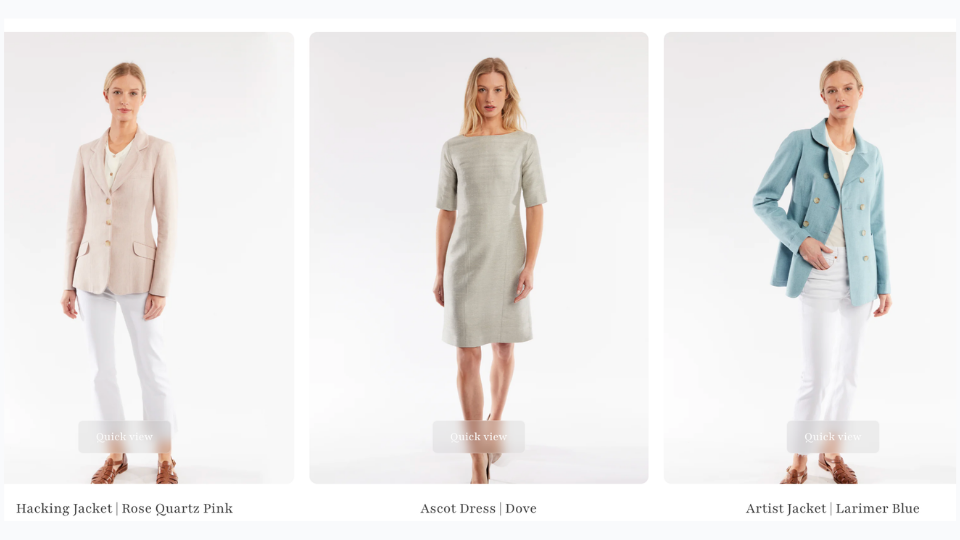
Apply Fabric takes an existing garment image and renders it in a different fabric

Before: What the Consultation Used to Rely On

Previously, the team worked with what bespoke fashion has always used: physical swatches, reference photographs of past garments, and years of expertise guiding clients toward the right choice. This worked — but it asked clients to make a leap. From a fabric square on a table to a finished coat on their body. For confident clients, that leap is manageable. For those who were less certain, or ordering remotely, it was a real source of doubt.

The New Workflow: Building a Visual Reference Library

Rather than generating visualisations reactively per client, the Katherine Hooker team used Apply Fabric to build a reference library — systematically applying the full range of available fabrics to their core coat styles. The usage data reflects this: multiple sessions over several weeks, each applying a different fabric to the same base garment, working through the entire material palette.

The result is a growing set of images that shows the same coat in navy tweed, olive cashmere, rust linen — each rendered with enough fidelity to make a genuine comparison. A resource that simply didn’t exist before, and couldn’t have been built through traditional photography at any reasonable cost.

In the Consultation: From Description to Demonstration

With this library in place, the consultation shifts. When a client hesitates between two fabrics, the team can show both — side by side, same style, same scale. When a remote client asks what a particular tweed looks like on the Braid coat, the answer is an image. Not a description, not a reassurance — an image.

The conversation moves from “I think you’d love how this tweed looks on the coat” to showing the client the coat in that tweed. That’s a meaningfully different kind of conversation.

What Changes When Clients Can See Before They Commit

The impact here isn’t measured in units or cost savings. It shows up in the quality of the moment when a client says yes.

Clients Decide With Confidence, Not Hope

A client who has seen a rendered image of their coat — in their exact fabric, on their exact style — arrives at their decision differently. The uncertainty that normally sits between selection and delivery narrows. They have a visual reference they can return to during the four to six weeks of production. What they receive feels like what they chose, because they actually saw it first.

Remote Consultations Become Genuinely Visual

For international clients, the shift is more significant. A client in New York who can see a rendered image of their coat, shared digitally before the order is placed, has a very different experience from a client working from swatches alone. The distance between London studio and US client shrinks. The investment feels better-anchored.

The visualisation doesn’t replace the consultation — it deepens it. It gives the team a shared visual language with clients who can’t be in the same room.

The Website Gains a New Kind of Content

The library built through Apply Fabric isn’t just a consultation tool. It’s content. A potential client browsing the Katherine Hooker website who can see the same coat rendered across multiple fabrics — navy tweed, ivory cashmere, sage linen — has a richer experience of the brand’s range. Images that start as studio reference assets become part of the full customer journey, from first discovery to order confirmation. And with Upscale, those assets can be brought to full web-ready resolution before they go live — making them ready for the kind of AI fashion photography workflow that high-end brands now use to produce professional imagery at scale.

Bring Your Custom Fabric Consultations to Life

Katherine Hooker is one of a growing number of bespoke and made-to-order fashion brands using Fashion Diffusion AI to help clients visualise custom orders before production begins.

Whether you run studio appointments, trunk shows, or an online custom order process, Apply Fabric gives you a way to show every client what their garment will look like in their chosen material — before the first stitch is made.

Try Fashion Diffusion AI free →

Some details have been presented as representative of typical use patterns and may not reflect the full scope of Mayo Chix’s operations. If you have questions about the content of this article or would like to clarify any information, please contact us at support@fashiondiffusion.ai.
Avatar photo 通过Sophia Mille

Mayo Chix × Fashion Diffusion AI: How a Fashion Brand with 60+ Stores Stopped Waiting on Photography

From studio bottleneck to same-day publishing — how a 35-year-old fashion brand with 60+ stores rebuilt its content production workflow with Fashion Diffusion AI.

What Is Mayo Chix?

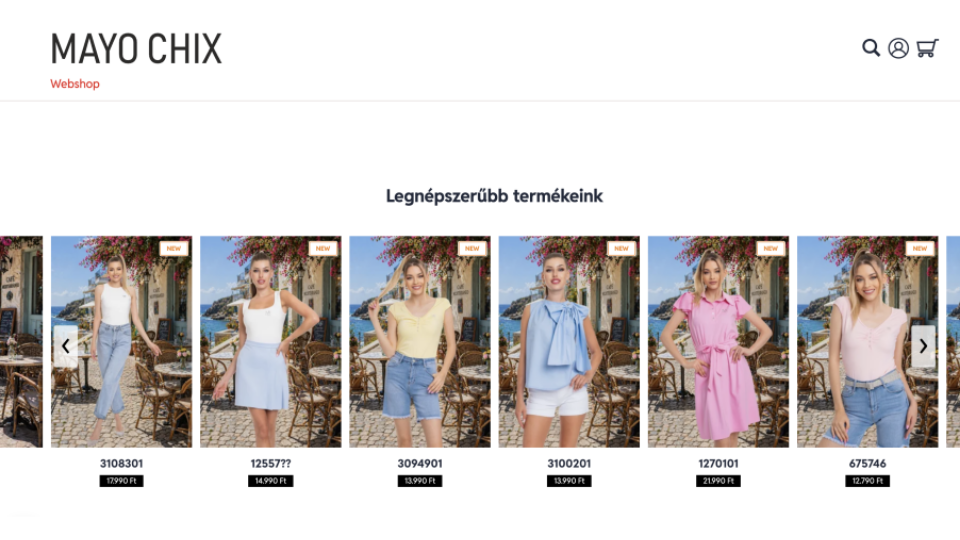
Mayo Chix webshop

Mayo Chix is Hungary’s largest homegrown women’s fashion brand. Established in 1989, the brand has grown steadily for more than 30 years. It now runs over 60 standalone stores covering all major shopping malls in Hungary, plus nearly 120 wholesale partners throughout Central and Eastern Europe.

Unlike most fashion brands that rely on external manufacturers and suppliers, Mayo Chix handles all design and production in-house. Its team of three designers creates original styles across multiple lines: dresses, denim, knitwear, blazers, outerwear and event outfits New arrivals hit the catalog on a rolling basis throughout the season.

Thanks to its in-house design process, vast product range and extensive sales network, creating product visuals has become one of the most challenging operational tasks for the brand.

The Challenge: Studio Photography Can’t Keep Pace With a Growing Catalog

With in-house collection design, plus a retail network of 60+ stores and 120 wholesale partners, Mayo Chix faces nonstop demand for product visuals. Every new style requires more than basic white-background product shots. It needs fully styled, contextual imagery and complete outfit pairings to show shoppers exactly how to wear each piece.

For Mayo Chix, the traditional studio photography model created three compounding problems.

Traditiona Fashion Product Photography Takes Days

Booking a studio, coordinating models and stylists, and completing post-production takes days — sometimes longer. For a brand pushing new arrivals continuously, that delay means products sitting in a queue while demand builds. Wholesale partners waiting on assets can’t activate new listings. The gap between a piece being ready and its imagery being finished has a direct cost.

Studio Photography Costs Scale With Every SKU

Traditional photography costs scale linearly with output. Every additional SKU adds to the budget. Showing outfit combinations — the same blouse styled three different ways with different bottoms from the same collection — multiplies the requirement again. At studio rates, comprehensive outfit merchandising is simply not viable across a full catalog.

One Product Shoot Produces One Version

Once a studio shoot is done, the imagery is fixed. Adapting it for different channels — a clean white background for the webshop, a lifestyle scene for social media, a seasonal setup for wholesale partner materials — means either reshooting or compromising on quality.

For a brand competing in a regional market alongside multinational fast-fashion chains with substantially larger production budgets, these constraints weren’t just inconvenient. They were a structural disadvantage.

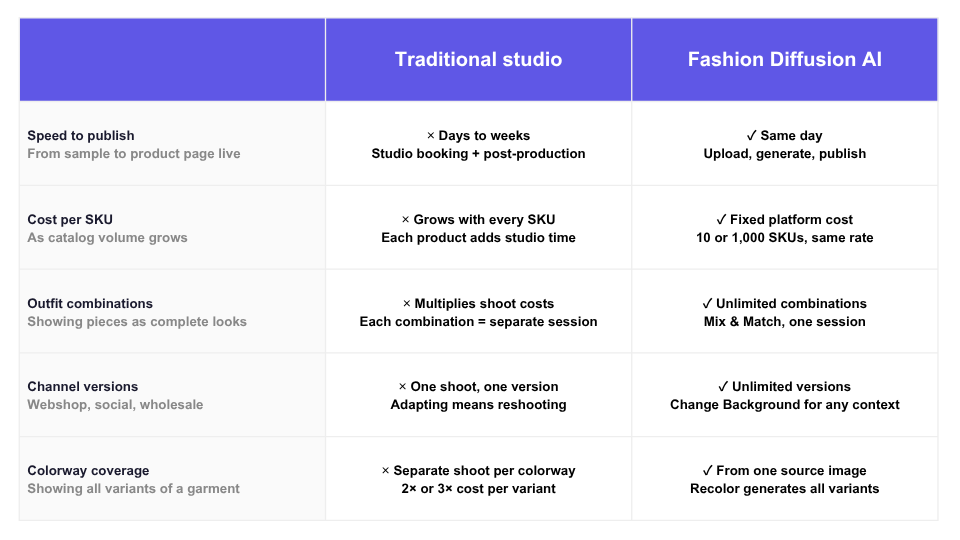
Traditional Studio vs Fashion Diffusion AI

How Mayo Chix Uses Fashion Diffusion AI

Mayo Chix integrated Fashion Diffusion AI into their product content workflow in May 2026, using it to process a full batch of new season arrivals across multiple categories in under a week. Here is how each feature contributes to the workflow.

1. Virtual Try-On — Show the Garment, Not Just the Product

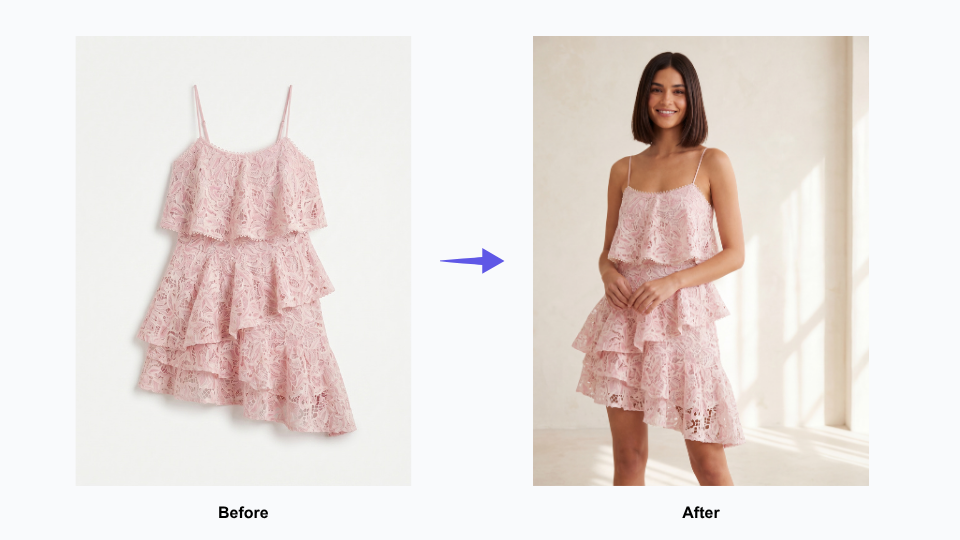
On-model imagery is the highest-converting format in fashion e-commerce — but it has always been the most expensive to produce. The moment a customer can see how a garment fits, drapes, and moves on a body, the purchase decision becomes real. Without that, a product page is asking shoppers to imagine too much.

Virtual Try-On makes on-model photography available for every piece in the catalog, without any of the costs that have traditionally made it selective. New arrivals no longer have to wait in a queue until a studio session can be arranged.

Conversion-ready product imagery is available the same day a product is cleared for listing. For brands constantly rolling out new inventory across 60+ stores and a wholesale network, this changes the economics of their entire content operation.

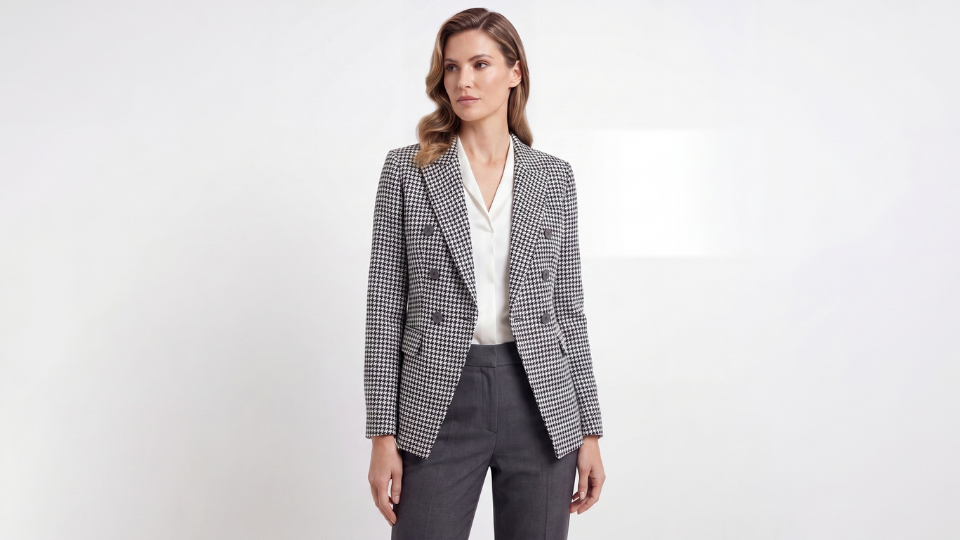
Virtual try on clothing online with Fashion Diffusion AI

2. Mix & Match — Turn Individual Pieces Into Shoppable Outfits

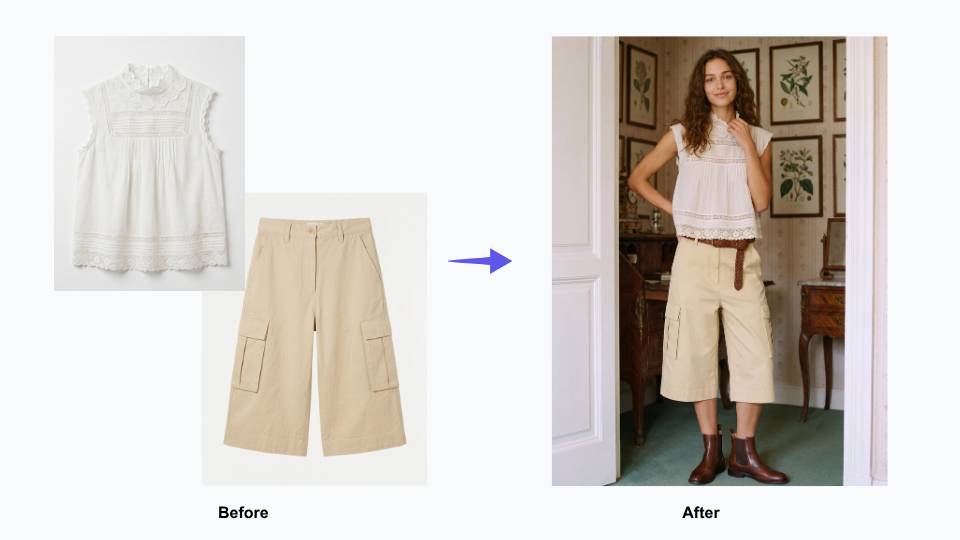
Fashion customers do not buy garments in isolation. They buy outfits. The product page that shows a blouse on its own communicates less than the page that shows it paired with three different bottoms from the same collection — and converts accordingly.

Outfit merchandising has always been the part of fashion content production that gets cut when budgets are tight, because shooting every possible combination multiplies studio costs quickly. Mix & Match removes that constraint. We can create full outfit visuals for every item in the catalog, not just key styles. These visuals clearly show how pieces from the latest collection match perfectly as complete looks.

At Mayo Chix, shoppers browse a wide range of items across different categories. This lets every product page deliver more value: it helps customers find matching pieces and gives them clear styling context to make purchases easily.

Mix & Match — Turn Individual Pieces Into Shoppable Outfits

3. Flat Lay Generator — Professional Catalog Imagery for Every Category

Not every garment tells its story best on a model. Knitwear, accessories, fabric-forward pieces, and wardrobe basics often communicate more clearly as a flat lay — where the texture, pattern, and construction of the garment are the focus, without a body competing for attention. Wholesale partners, too, frequently prefer flat lay imagery for catalog listings and lookbooks.

Flat lay production has traditionally required its own studio setup, separate from model photography — adding cost and time to an already complex workflow. Having AI-generated flat lay imagery as part of the same pipeline means Mayo Chix can cover every category of their catalog in the format that suits it best, without managing two separate production tracks.

Flat Lay Generator — Professional Catalog Imagery for Every Category

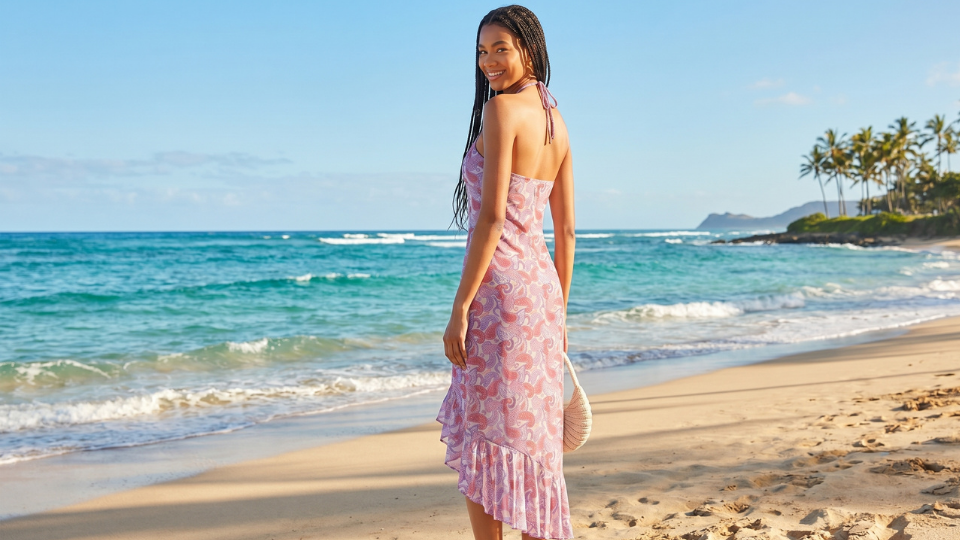
4. Change Background — One Shoot, Every Channel

A strong product image should work across every channel a fashion brand uses — from ecommerce stores and social media to seasonal campaigns and wholesale marketing materials. But in reality, brands often have to choose between expensive reshoots or reusing images that were never designed for those different contexts.

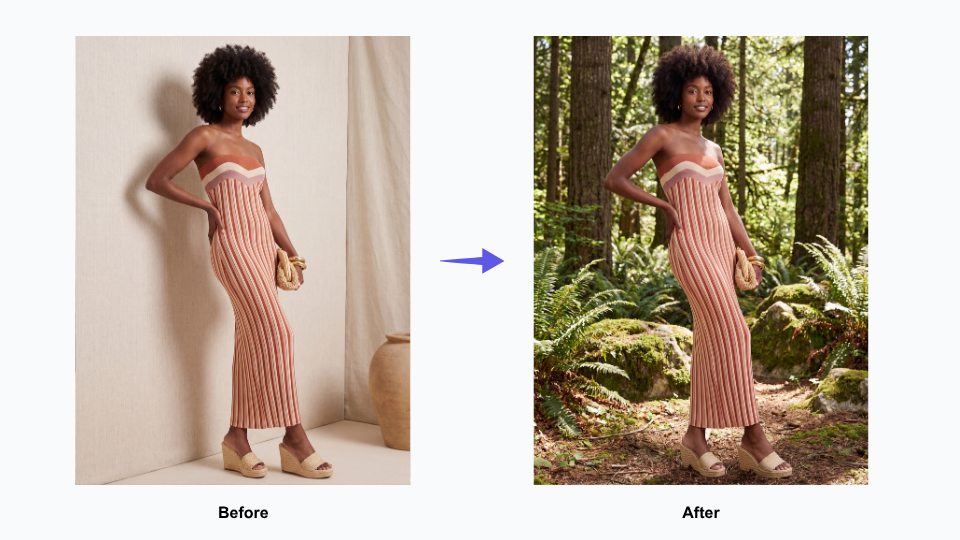
Change Background gives Mayo Chix’s existing product imagery a second and third life without any additional photography. A clean webshop image becomes a lifestyle scene for social. A lifestyle scene becomes a seasonal backdrop for a wholesale partner’s campaign.

For a brand distributing assets to 120 wholesale partners — all with different channel and content requirements — this flexibility has a major operational impact. It helps partners launch new products faster, keeps branding more consistent across every sales channel, and reduces the constant need for custom reshoots and reformatted assets.

Change Background with AI

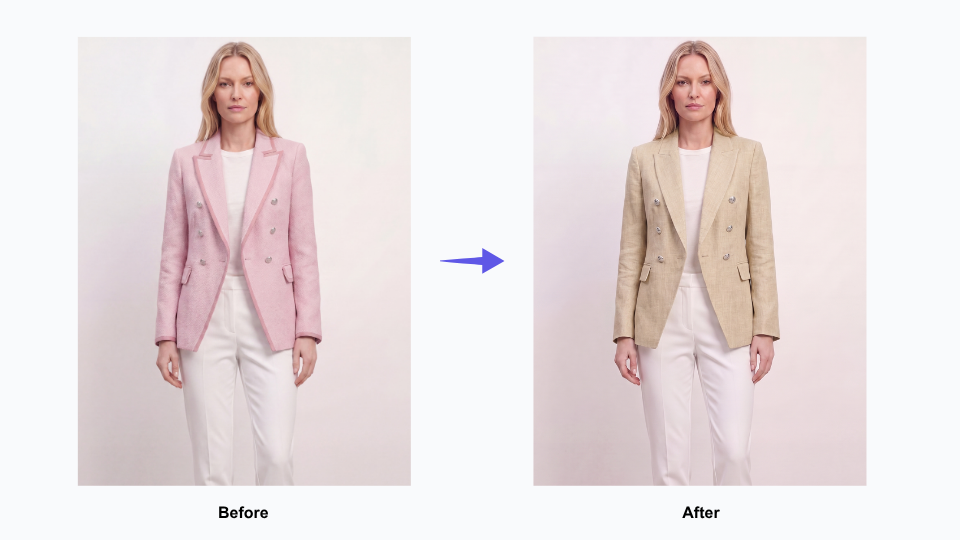
5. AI Recolor — Explore Colorways Without a Second Shoot

When a garment comes in multiple colorways, showing each one properly has traditionally meant shooting each one separately — doubling or tripling the photography requirement for a single SKU. For brands planning pre-season presentations or updating webshop pages to reflect full colorway availability, that cost adds up quickly.

Fashion Diffusion’s Recolor tool generates accurate colorway variations from a single source image, making it practical to show every version of a product without additional studio time. For Mayo Chix’s wholesale presentations and webshop listings, this means colorway pages can be complete from launch — rather than filling in as additional photography becomes available.

AI Recolor — Explore Colorways Without a Second Shoot

From Multi-Week Backlog to a Streamlined AI Photography Workflow

The most significant outcome from Mayo Chix’s Fashion Diffusion AI workflow is one that doesn’t show up in a single metric: the compression of the entire content production cycle.

Under a traditional studio photography model, processing a batch of new season arrivals across multiple categories — dresses, denim, knitwear, outerwear, occasion wear — would require multiple studio days, model bookings, and a post-production window before a single image is ready to publish. The imagery for a full new arrivals batch might take two to three weeks from sample availability to webshop-ready assets.

Mayo Chix delivered its full catalog asset set—including Mix & Match outfit looks, flat lay catalog shots, channel-specific background variations, virtual on-model try-on imagery, and all colorway variants—through one streamlined workflow, managed entirely by a single team member.

The downstream effects compound from there. New arrivals go live on the webshop faster. Wholesale partners receive assets sooner, which means faster listing activation across the partner network. The in-house design team can see how a new collection looks in finished imagery earlier in the process, creating more room to adjust styling direction before stock hits the stores.

For a 35-year-old brand with a regional footprint competing in a fast-moving market, speed to imagery is speed to market — and that matters.

Start Your Own AI Imagery Workflow

Mayo Chix joins countless fashion brands that leverage Fashion Diffusion AI. It helps create high-quality product visuals far more quickly, while slashing costs compared to traditional studio photography.

No matter you have 50 or 5,000 products in your catalog, this solution fits perfectly with your business scale. The all-in-one platform supports full-featured needs: outfit matching, flat lay shots, model wear visuals, background adjustment and different color variant previews.

Try Fashion Diffusion AI free →

Some details have been presented as representative of typical use patterns and may not reflect the full scope of Mayo Chix’s operations. If you have questions about the content of this article or would like to clarify any information, please contact us at support@fashiondiffusion.ai.