月度归档 2026年11月18日

Avatar photo 通过Ethan Davis

AI UGC Video Tutorial: How to Turn Product Photos into Videos

Creating product videos with real creators takes time. You need to arrange shoots, prepare products, coordinate filming and go through multiple rounds of editing. For brands with large product catalogs, producing enough content for social media can quickly become expensive.

AI offers another way to create this kind of content. Instead of filming every product from scratch, you can start with product photos, describe the scenes and actions you want, and generate short videos in a UGC style.

With Fashion Diffusion’s AI Video Generator, you can turn multiple product images into a promotional video guided by a visual shot plan. Its customizable video brief lets you define the style, setting, product interactions and dialogue before generating the video.

What Is an AI UGC Video

An AI UGC video is an AI-generated video designed to resemble user-generated content. It often features casual camera angles, everyday settings, natural product interactions and conversational dialogue.

Unlike traditional product commercials, which tend to use polished lighting and carefully staged scenes, UGC-style videos feel more personal and less scripted. Brands use this format for product demonstrations, social media content and advertising on platforms like TikTok, Instagram Reels and YouTube Shorts.

AI makes it possible to create this style of content from existing product images, without arranging a traditional filming session for every video.

What Makes an AI UGC Video Feel Natural

A convincing UGC-style video is not just about adding a handheld camera effect. The setting, product interactions and dialogue all need to feel consistent with everyday content.

Everyday Settings and Natural Lighting

Choose locations that make sense for the product. A handbag might appear in a café or apartment, while skincare products fit naturally into a bathroom or morning routine. Soft daylight and familiar surroundings help create a more casual look than a studio setup.

Realistic Product Interactions

Show how someone would actually use or wear the product. Picking up a bag, putting on a jacket or applying skincare gives viewers a better sense of the product than simply showing it from different angles. Keep the actions simple and clearly connected to the product. Too many movements or complicated transitions can make a short clip feel unnatural.

Conversational Dialogue

UGC-style dialogue should sound like something a person would say in everyday life. For example, “I didn’t expect this bag to fit my laptop” feels more personal than “Introducing our premium leather tote.” Short sentences, specific observations and a relaxed tone work better than formal advertising language.

How to Make an AI UGC Video in Four Steps

Fashion Diffusion’s Product Promo Video lets you build a video from product images using a customizable video brief and visual shot plan. Follow these four steps to turn your product photos into a short promotional video.

Step 1. Prepare and Upload Your Product Images

Start with clear product photos that show the item’s shape, color and details. You can also upload a photo of a person, such as a model or creator, if you want a specific look in the video.

For better video results, you can first use a flat lay generator to turn your product photos into clean, professional white-background product shots. Then upload the generated images to Product Promo Video as references for video generation.
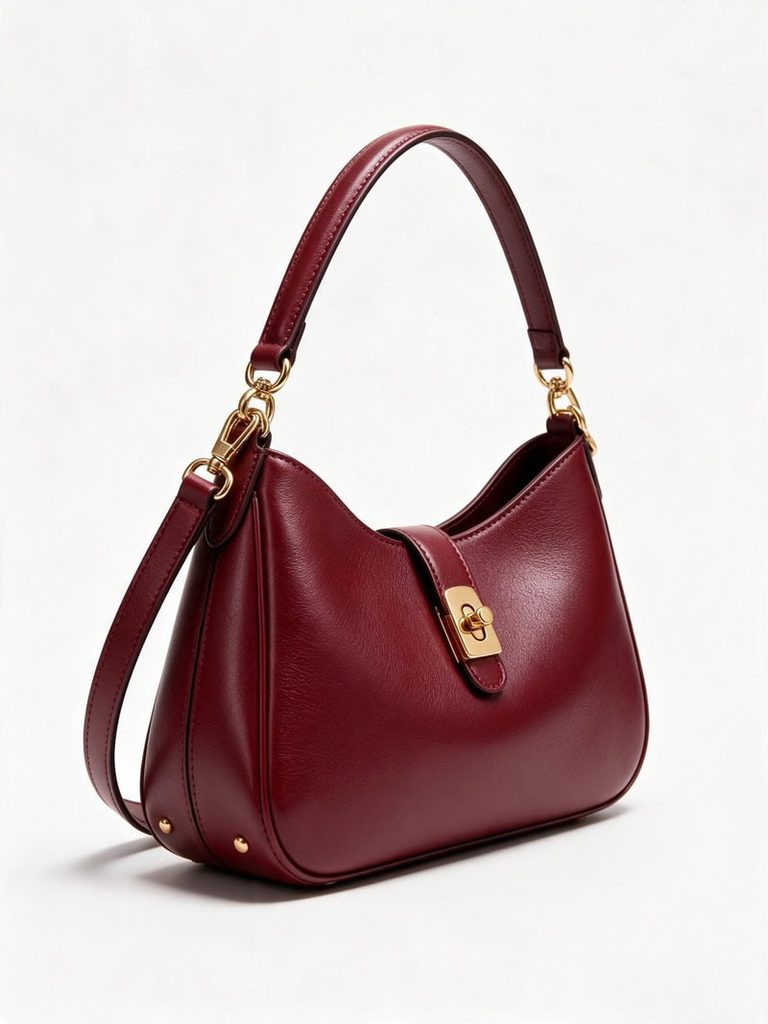
product photo
Fashion Diffusion AI-generated

Step 2. Write Your Video Brief

Once your images are ready, fill in the six fields in the Video Brief section. Each field controls a different part of the video:

  • Goal: Explain what you want the video to achieve, such as introducing a new handbag or highlighting its storage space.
  • Style: Choose the overall look. For a casual product recommendation, select UGC.
  • Scene: Describe where the video takes place, such as a bright apartment, café or city street.
  • Shots & Actions: Outline the sequence of shots and what happens in each one.
  • Dialogue & Text: Add spoken lines, voiceovers or on-screen captions.
  • Other: Include extra instructions for camera movement, pacing, transitions or brand requirements.

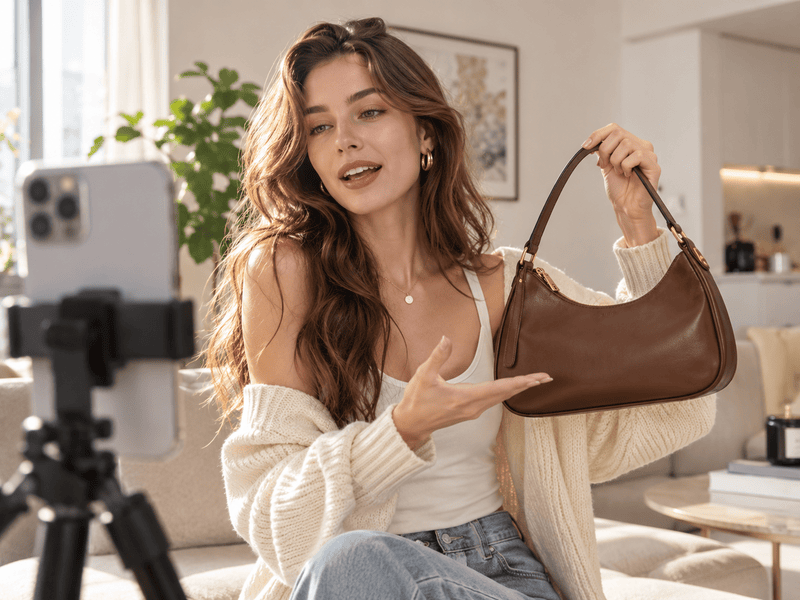
For the handbag example, you could use a simple concept: a creator shows the bag in her apartment and a casual café shop, puts it on her shoulder and demonstrates what fits inside.

You don’t have to write every detail from scratch. Fashion Diffusion also provides templates that you can use as a starting point. Choose a suitable example, then adjust the product, setting and dialogue to match your own idea.

Step 3. Generate and Review the Shot Plan

After completing your brief, generate your shot plan.

Fashion Diffusion turns your instructions into a visual sequence of shots, so you can review how the video will unfold before generating the final clip.

For the handbag example, the shot plan might include an opening close-up of the bag, a shot of the creator picking it up, and a final scene showing how it looks when worn. Check that the product appears consistently and that each action follows the intended sequence.
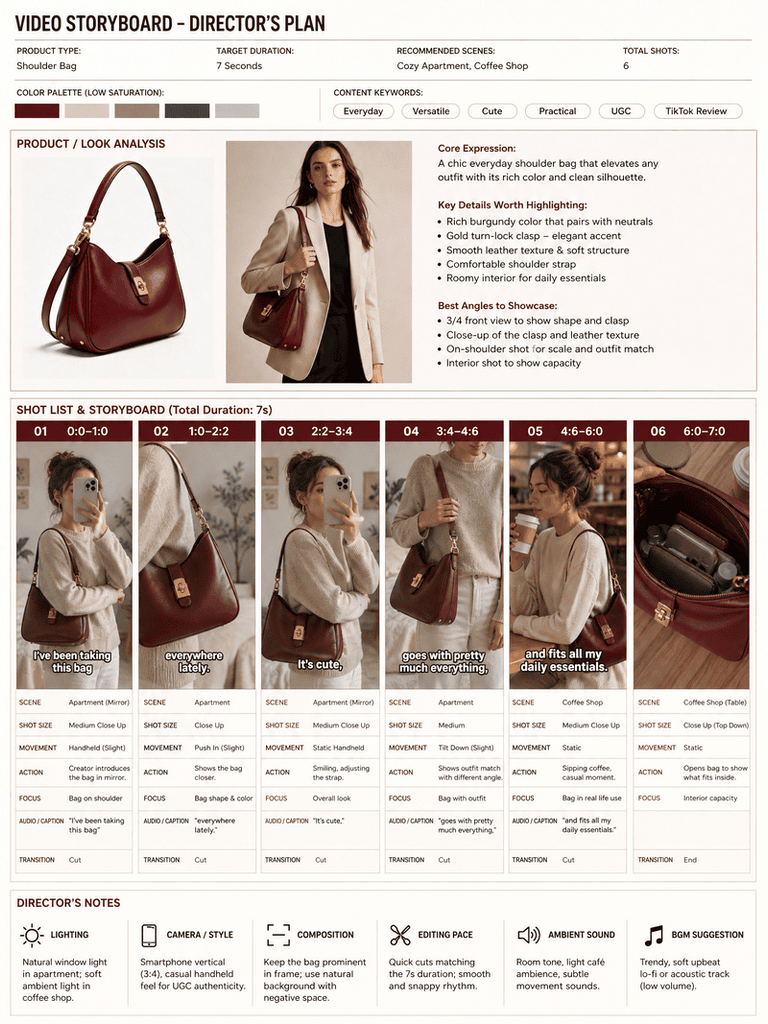
generate the shot plan
Fashion Diffusion AI-generated

If a shot doesn’t match your idea, go back to the brief and adjust the relevant instructions. Reviewing the plan first helps you refine the concept before spending credits on video generation.

Step 4. Generate and Export Your Video

Once you’re happy with the shot plan, choose your video duration and aspect ratio. Fashion Diffusion supports clips from 4 to 15 seconds, so you can create anything from a quick product highlight to a short product story. After generation, review the video and download the result.

AI UGC Video Ideas for Different Products

Different products call for different video concepts. Sneakers work well with street-style footage, while skincare products are better suited to morning routines. Here are four ideas you can try with Fashion Diffusion’s Product Promo Video.

1. Sneakers: Casual Street Style

Show the sneakers in motion and highlight their design from different angles. Use a city sidewalk or an outdoor café as the setting. Start with a close-up of the shoes, then show the creator walking and styling them with a casual outfit.

Video Brief Idea:

  • Goal: Highlight the sneakers’ design and everyday wearability.
  • Style: UGC / Street Style
  • Scene: City sidewalk with natural daylight.
  • Shots & Actions: Close-up of sneakers, walking shot, full outfit reveal.
  • Dialogue & Text: “These might be my new everyday sneakers.”

2. Skincare Serum: Morning Routine

A morning-routine concept works well for skincare because it shows the product as part of an everyday habit. Set the scene in a bright bathroom with soft natural light. Show the creator picking up the serum, applying a few drops and placing the bottle beside the mirror.

Video Brief Idea:

  • Goal: Showcase the serum’s application and make it part of a daily skincare routine.
  • Style: UGC / Morning Routine
  • Scene: Minimalist bathroom with soft morning light.
  • Shots & Actions: Serum bottle close-up, product application, creator holds the bottle near the mirror.
  • Dialogue & Text: “This is the first thing I reach for every morning.”

3. Necklace: Get Ready With Me

Jewelry videos benefit from close-up shots that show how a piece looks when worn. Create a GRWM-style video featuring a creator getting ready for a day out. Show her fastening the necklace, adjusting the chain and checking the final look in the mirror.

Video Brief Idea:

  • Goal: Highlight the necklace’s design and how it completes an outfit.
  • Style: UGC / Get Ready With Me
  • Scene: Bedroom vanity with warm natural light.
  • Shots & Actions: Necklace close-up, creator fastens the chain, final outfit detail.
  • Dialogue & Text: “A simple necklace makes such a difference.”

4. Knit Cardigan: Cozy Lifestyle

For knitwear, focus on texture, comfort and everyday styling. A cozy indoor setting with soft window light can create a relaxed lifestyle feel. Show the creator putting on the cardigan, adjusting the sleeves and sitting down with a cup of coffee.

Video Brief Idea:

  • Goal: Showcase the cardigan’s texture, fit and everyday styling.
  • Style: UGC / Cozy Lifestyle
  • Scene: Cozy apartment by a large window.
  • Shots & Actions: Cardigan close-up, creator puts it on, sleeve detail and relaxed lifestyle shot.
  • Dialogue & Text: “This is exactly what I want to wear on a chilly day.”

These examples are starting points rather than fixed scripts. You can change the setting, actions and dialogue to match your brand’s visual style and the product features you want to highlight.

AI UGC Video Hooks to Capture Attention

The opening line or scene gives viewers a reason to keep watching. Instead of starting with a generic product introduction, try opening with a relatable problem, an unexpected detail or a specific benefit.

Here are a few hook ideas to adapt:

  • Problem-Solution: “Why does every tote bag look good but fit nothing?”
  • Unexpected Find: “I wasn’t planning to buy another pair, but…”
  • Quick Result: “Here’s what changed my morning routine.”
  • Personal Favorite: “The one accessory that pulls my whole outfit together.”
  • Curiosity: “Wait until you see how much fits inside.”

Keep your opening short and connect it to what viewers will see next. A hook about storage space, for example, works best when the following shot actually demonstrates the bag’s capacity.

AI UGC Videos vs. Real Creator Videos

AI-generated UGC-style videos and traditional creator content serve different purposes. The right choice depends on your production budget, content needs and marketing goals.

FactorReal Creator VideosAI UGC Videos
ProductionRequires filming, scheduling and editingGenerated from existing product images and a video brief
CostCreator fees and production costsCredits per generation
Content VariationsLimited by filming resourcesEasy to test different scenes, hooks and styles
AuthenticityFeatures real people and their actual experiencesRecreates a casual UGC style but not genuine customer experiences
Best ForTestimonials, creator partnerships and brand storytellingProduct showcases, creative testing and social media content

Real creator videos remain valuable when genuine product experiences and personal recommendations matter. AI-generated videos are useful when brands need more creative variations without arranging a new shoot for every product.

The two approaches can also work together. Brands can use real creators for testimonials and community building, while AI-generated videos help expand their product content library.

If you want to explore more AI-assisted video workflows, see our guide on creating fashion videos without filming.

Common AI UGC Video Mistakes and How to Fix Them

Even with a clear brief, AI-generated videos may not always match your expectations. Here are some common issues and ways to improve your results.

The Product Changes Shape Between Shots

This can happen when different shots describe the product inconsistently. Repeat the product name and key visual details in each shot, especially details such as color, shape and material.

Every Video Features the Same-Looking Person

If you want more control over the person in your video, upload your own model photo along with the product images. This gives the generation process a visual reference for the desired appearance.

Dialogue Feels Rushed

A script that is too long can be difficult to fit into a short clip. Keep spoken lines concise and focus on one main message rather than trying to explain every product feature.

Shots Don’t Match the Product

Sometimes the shot plan may interpret an uploaded image differently from what you intended. Use clear product photos, provide multiple angles where possible and refine the relevant instructions before generating the video.

On-Screen Text or Logos Look Distorted

AI-generated text and brand details may not always be accurate. Add final captions, product names and brand graphics during post-production rather than relying entirely on generated text.

Create Your First AI UGC Video with Fashion Diffusion

You don’t need a separate filming session to start experimenting with UGC-style product content. With a few product photos and a clear creative brief, you can explore different scenes, product interactions and video concepts.

Fashion Diffusion brings the process together, from uploading product images and building a shot plan to generating your final video.Start with one product, try a few different creative directions and see which style works best for your brand.

FAQ

What is an AI UGC video?

An AI UGC video is an AI-generated video designed to look like user-generated content, with casual camera angles, everyday settings, natural product interactions and conversational dialogue. Brands use it for product demos and social media content on TikTok, Instagram Reels and YouTube Shorts.

Can I make an AI UGC video from product photos only?

Yes. Upload clear product photos to Fashion Diffusion’s Product Promo Video, fill in a video brief describing the style, scene, shots and dialogue, and the tool generates a shot plan and video from your images. You can also add a model or creator photo if you want a specific look.

What do I need to include in a video brief?

The brief has six fields: Goal, Style, Scene, Shots & Actions, Dialogue & Text, and Other. Together they define what the video should achieve, how it looks, what happens in each shot and what is said. You can start from a template and adjust the product, setting and dialogue.

How long can an AI UGC video be?

Fashion Diffusion supports clips from 4 to 15 seconds, which suits anything from a quick product highlight to a short product story. You can also choose the aspect ratio before generating.

How do I keep the product looking consistent across shots?

Repeat the product name and key visual details, such as color, shape and material, in every shot description. Using clear photos from multiple angles also helps. Reviewing the shot plan before generating lets you catch inconsistencies before spending credits.

Can AI UGC videos replace real creator videos?

Not entirely. AI UGC videos are well suited to product showcases, creative testing and producing many variations without new shoots. Real creator videos remain better for genuine testimonials, creator partnerships and brand storytelling, and the two approaches work well together.
Avatar photo 通过Ethan Davis

From Dress to Bikini: How to Create New Swimwear Looks with AI

Want to see how a different swimsuit style would look in your photo? You don’t need to change outfits or take another picture. With an AI bikini generator, you can explore different swimwear designs using your existing model photos.

From classic triangle bikinis to trendy halter styles and elegant one-piece swimsuits, AI makes it easy to experiment with different cuts, colors, and fabrics. You can also use simple prompts to customize the details and create a variety of summer looks.

In this guide, we’ll show you how to change a dress to a bikini with AI, explore different swimwear styles, and share practical prompts to help you create your own looks.

Change Your Outfit in Three Simple Steps

Fashion Diffusion’s AI bikini generator lets you explore custom swimwear designs and create realistic on-model visuals. You can describe the bikini style you want, upload reference images, and refine the design through prompts.

Here’s how to get started.

Step 1. Upload Your Photo

Open the AI Bikini Generator and upload your original model photo or a suitable visual reference.

For a dress-to-bikini transformation, start with a clear photo of an adult model wearing a dress. A well-lit image with a visible outfit and unobstructed clothing details provides a better starting point.

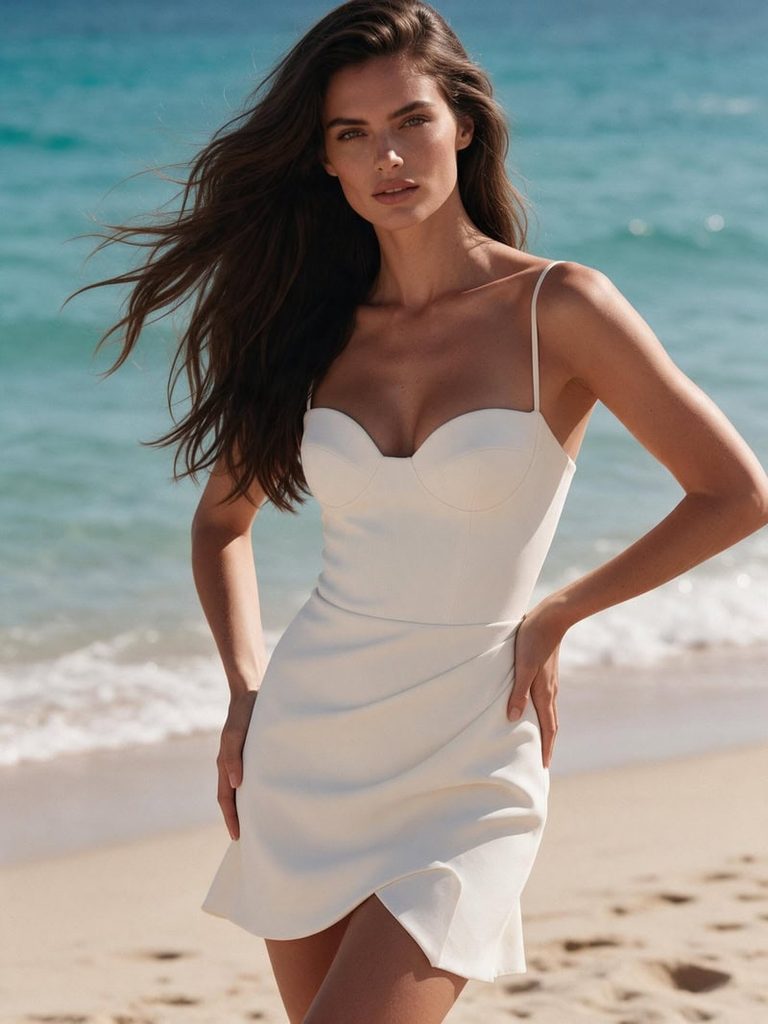
Upload original dress on model photo.
Fashion Diffusion AI-generated

Step 2. Describe Your Bikini Style

Enter a prompt describing the swimsuit you want. Include details such as the bikini cut, color, fabric, straps, and decorative elements.

For example:

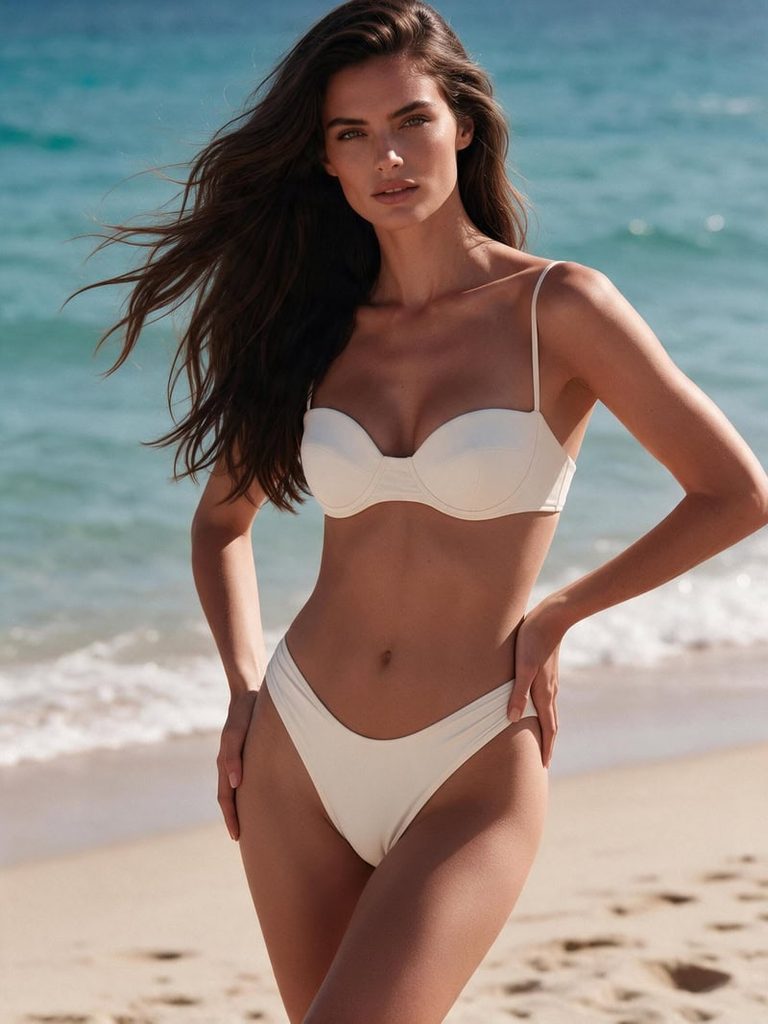
Replace the dress with a sexy, elegant ivory white bikini. A structured sweetheart bikini top with delicate thin straps, flattering high-cut bottoms and subtle draped fabric details. Modern, feminine swimwear design with a clean silhouette, stylish and slightly daring. Keep the same adult model, face, hairstyle, pose, beach background and lighting. Preserve the original ivory white color and luxurious summer resort aesthetic. Realistic high-end swimwear editorial photography.

You can experiment with different styles, from simple solid-color bikinis to printed designs and more distinctive silhouettes.

Step 3. Generate and Explore Different Looks

Generate your image and review the result. Try changing the bikini style, color, or fabric to explore more variations.

Final dress to bikini output.
Fashion Diffusion AI-generated

You can also adjust your prompt or reference image to refine the design. This makes it easier to compare different swimwear looks without starting from scratch every time.

From Dress to Bikini: 6 Styles to Try with AI

You don’t need an existing dress photo to get started. You can first create a model wearing a dress with Fashion Diffusion’s AI Outfit Generator, then use the AI Bikini Generator to transform the outfit into a matching bikini.

The idea is simple: keep the original color palette and overall style while changing the garment’s silhouette and design. This creates a more consistent before-and-after comparison and lets you explore different swimwear looks from one fashion concept.

Here are six styles to try, each with two prompts.

1. Classic Red Bikini

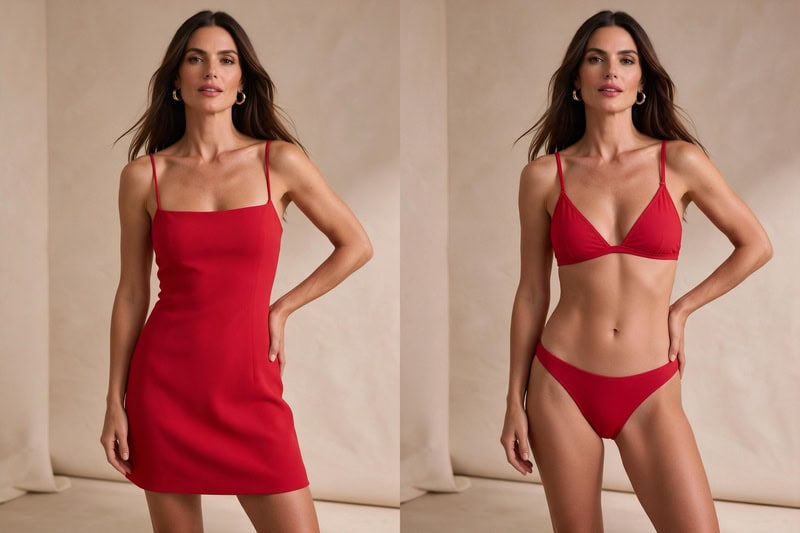
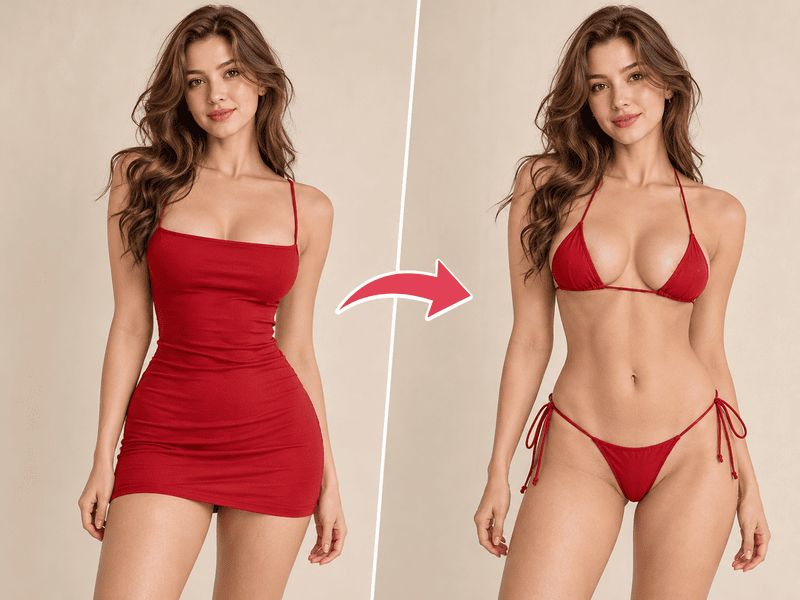
A classic red dress makes a great starting point for a bold summer look. Keep the vibrant red tone when switching to a simple triangle bikini for a clean, coordinated result.

Original Dress Prompt:

A stylish adult woman with long dark brown hair, wearing a fitted red mini dress with thin straps and a simple square neckline. Standing confidently against a warm beige studio background, natural pose, soft lighting, modern summer fashion editorial photography.

Bikini Transformation Prompt:

Replace the red dress with a matching red triangle bikini featuring delicate adjustable straps and a clean, minimal design. Keep the original model, face, pose, background, and lighting consistent. Preserve the vibrant red color and create realistic swimwear fabric details.

dress to classic red bikini.
Fashion Diffusion AI-generated

2. Black Halter Bikini

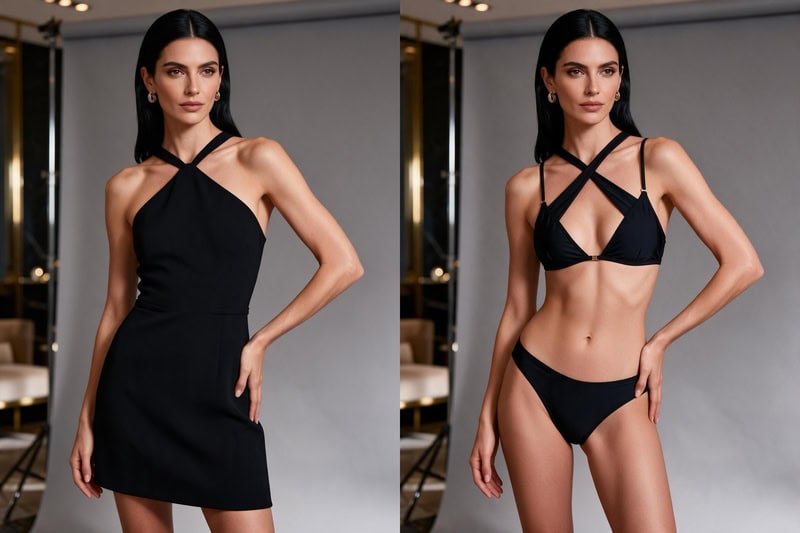
A sleek black dress can easily transition into a sophisticated black halter bikini. This combination works well for a polished, minimalist fashion aesthetic.

Original Dress Prompt:

An adult woman with sleek black hair, wearing a fitted black mini dress with a halter neckline and subtle waist detailing. Standing in a modern luxury studio with a soft gray background, elegant pose, understated fashion editorial photography.

Bikini Transformation Prompt:

Replace the black dress with a matching black halter bikini featuring a flattering neckline, delicate straps, and subtle gold hardware. Keep the original model, face, pose, background, and lighting consistent. Maintain the sleek black aesthetic and realistic fabric texture.

dress to black halter bikini.
Fashion Diffusion AI-generated

3. Pastel Pink Bandeau Bikini

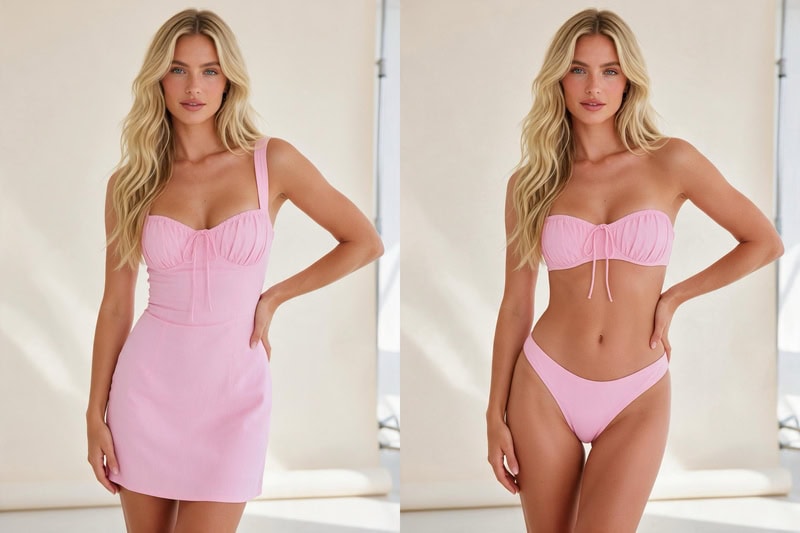
Soft pink and delicate silhouettes create a playful, feminine summer look. Start with a pastel pink dress, then transform it into a matching bandeau bikini.

Original Dress Prompt:

An adult woman with long blonde wavy hair, wearing a pastel pink fitted mini dress with a sweetheart neckline and delicate gathered details. Standing in a bright studio with a soft cream background, relaxed pose, fresh summer fashion photography.

Bikini Transformation Prompt:

Replace the pink dress with a matching pastel pink bandeau bikini featuring a softly structured strapless top and delicate gathered details. Keep the original model, face, pose, background, and lighting consistent. Preserve the soft pink color palette and realistic fabric appearance.

dress to pastel pink bandeau bikini.
Fashion Diffusion AI-generated

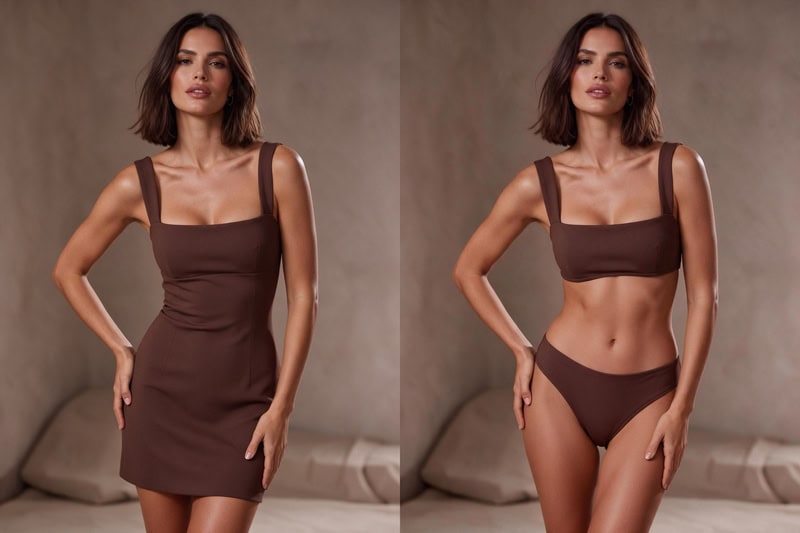
4. Chocolate Brown High-Waisted Bikini

Chocolate brown is a popular choice for understated summer styling. A fitted brown dress can be transformed into a coordinated high-waisted bikini with a retro-inspired silhouette.

Original Dress Prompt:

An adult woman with shoulder-length dark brown hair, wearing a fitted chocolate brown mini dress with a square neckline and wide shoulder straps. Standing against a warm taupe studio background, relaxed confident pose, muted luxury fashion editorial style.

Bikini Transformation Prompt:

Replace the chocolate brown dress with a matching high-waisted bikini featuring a structured square-neck top and high-rise bottoms. Keep the original model, face, pose, background, and lighting consistent. Maintain the warm brown color palette and refined minimalist aesthetic.

dress to chocolate brown bikini.
Fashion Diffusion AI-generated

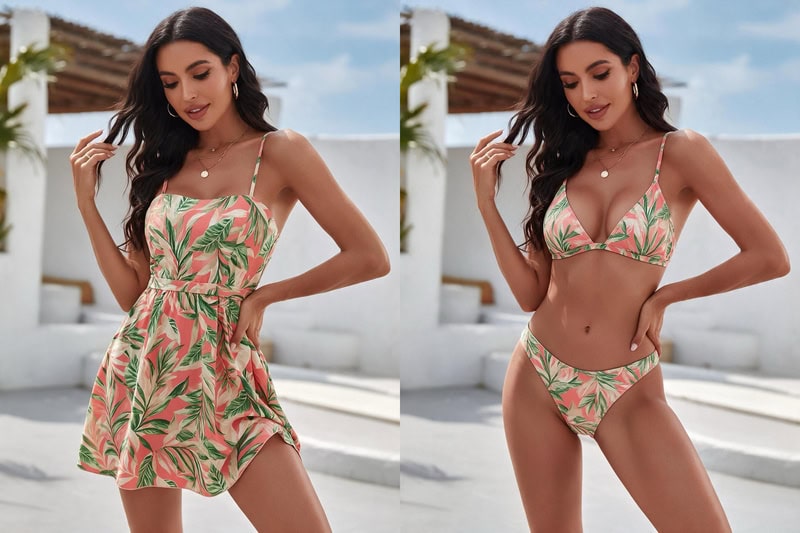
5. Tropical Printed Bikini

For a more playful summer look, try a colorful tropical-print dress as the starting point. Keep the same print and color combination when transforming it into a matching bikini.

Original Dress Prompt:

An adult woman with long dark wavy hair, wearing a tropical-print mini dress featuring coral pink, leafy green, and cream tones. The dress has a fitted waist and delicate shoulder straps. Set against a bright resort-inspired background, relaxed summer pose, vibrant yet tasteful vacation photography.

Bikini Transformation Prompt:

Replace the tropical-print dress with a matching triangle bikini featuring the same coral pink, leafy green, and cream floral pattern. Keep the original model, face, pose, background, and lighting consistent. Preserve the print colors and create realistic swimwear fabric details.

dress to tropical printed bikini.
Fashion Diffusion AI-generated

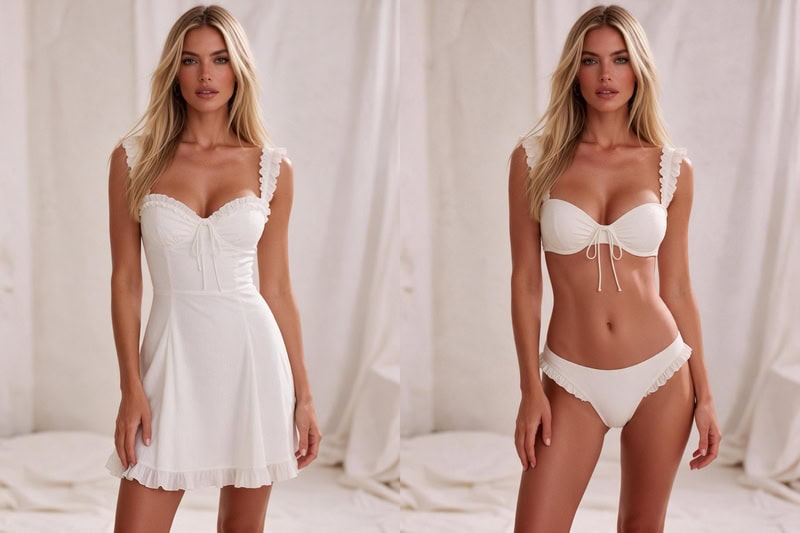
6. White Ruffle Bikini

A white dress with delicate details provides a great base for a romantic swimwear look. Transform its soft, feminine style into a matching white ruffle bikini.

Original Dress Prompt:

An adult woman with long blonde hair, wearing an elegant white mini dress with delicate ruffle details, a sweetheart neckline, and subtle textured fabric. Standing against a soft ivory studio background, natural pose, dreamy summer fashion editorial photography.

Bikini Transformation Prompt:

Replace the white dress with a matching white bikini featuring delicate ruffle details, a sweetheart-style top, and subtle textured fabric. Keep the original model, face, pose, background, and lighting consistent. Preserve the soft ivory color palette and feminine aesthetic.

dress to white ruffle bikini.
Fashion Diffusion AI-generated

Tips for Getting Realistic AI Bikini Photos

A few simple adjustments can help improve your AI-generated swimwear images.

  • Choose a clear source photo: Good lighting and visible clothing details provide a better starting point.
  • Specify the bikini design: Describe the neckline, straps, silhouette, and coverage instead of using a generic description.
  • Experiment with colors and fabrics: Try different color combinations, satin finishes, ribbed textures, and printed patterns.
  • Keep the original photo consistent: If you want to preserve the model and setting, mention the original appearance, pose, and background in your prompt.
  • Refine one detail at a time: If the bikini shape or color isn’t right, adjust that specific part instead of rewriting the entire prompt.

More Ways to Explore Your Bikini Looks

Changing a dress into a bikini is just one way to experiment with swimwear styles. If you want to try something different or do more with the images you’ve created, here are two more ways to explore.

If you want to try a different approach to creating bikini photos, the AI Dress Remover is worth exploring. Instead of describing every detail in a prompt, simply upload a dress photo and let AI create a matching bikini look based on the original outfit. It’s a handy way to experiment with different swimwear styles while keeping the original colors and overall aesthetic.

And if you’ve created a bikini look you really like, you can take it beyond a still image. The AI Bikini Video Generator lets you turn your bikini photos into short videos, adding movement to your new look. It’s a fun way to create more eye-catching swimwear content without having to start over.

Create Your Own Bikini Looks with AI

Turning a dress into a bikini is just one way to play with AI fashion. Whether you love classic swimwear cuts, bold color combinations, or small details like ties and cutouts, a simple prompt and a reference image are all you need to try a new look.

Curious how it would look on you? Head over to Fashion Diffusion and start experimenting with our AI-powered fashion design and photo editing tools.

FAQ

Can AI turn any outfit into a bikini?

AI can help transform many types of clothing into swimwear designs. Results depend on the original image, clothing visibility, pose, and the complexity of the requested design.

Can I change a dress into a one-piece swimsuit?

Yes. You can describe a one-piece swimsuit instead of a bikini in your prompt. Specify details such as the neckline, straps, color, and silhouette to guide the design.

Can I try different bikini colors and patterns?

Yes. You can experiment with different colors, prints, fabrics, and design details by adjusting your prompts or uploading reference images.

How can I get more realistic AI swimwear images?

Start with a clear, well-lit source photo and describe the desired swimsuit in detail. Include its cut, fabric, and color, and specify which parts of the original photo you want to keep consistent. Refine the prompt if the first result needs adjustments.

Can I change a dress to a bikini with AI for free?

Yes. Some AI bikini generators offer free credits for new users, allowing you to try different swimwear designs without an upfront payment. Fashion Diffusion provides free credits when you create a new account. Additional usage may require a paid plan.

Avatar photo 通过Sophia Mille

How to Make Stunning AI Hot Girl Photos From Scratch or Existing Images

Want to create eye-catching AI hot girl photos in styles ranging from glamorous portraits to trendy Instagram looks? With an AI hot girl generator, you can turn a simple text prompt into a stylish portrait featuring your preferred outfit, hairstyle, makeup, and setting. If you need inspiration, explore different styles and ideas with our collection of AI hot girl prompts.

But creating a new image is only one part of the process. You can also use AI to edit an existing photo, change outfits, try new backgrounds, or experiment with different looks. In this guide, you’ll learn how to create and edit AI hot girl photos for free, with practical prompts and tips for getting more realistic results.

What Are AI Hot Girl Photos

AI hot girl photos are AI-generated or AI-edited images featuring attractive adult women in different fashion styles, poses, and settings. They can range from casual Instagram portraits to glamorous editorial photography.

Unlike traditional photoshoots, AI image tools let you experiment with different looks without changing outfits, booking a studio, or arranging a photoshoot.

Here are some popular styles to explore:

  • Glamour Photography: Elegant outfits, polished makeup, and sophisticated settings.
  • Instagram Baddie: Trendy fashion, confident poses, and stylish everyday environments.
  • Fashion Editorial: Statement outfits, creative compositions, and professional lighting.
  • Lifestyle Photography: Natural poses, casual outfits, and relaxed surroundings.

You can generate these images from scratch or use AI photo editing to transform pictures you already have.

How to Create AI Hot Girl Photos for Free

Creating AI hot girl photos starts with a clear idea of the look you want. An AI hot girl generator can turn a text description into a complete portrait, giving you control over the model’s appearance, outfit, pose, and surroundings.

Follow these three steps to get started.

Step 1. Choose an AI Hot Girl Generator

Start with an AI image generator that supports realistic fashion and portrait creation. A fashion-focused tool gives you more control over clothing details, styling, and model presentation.

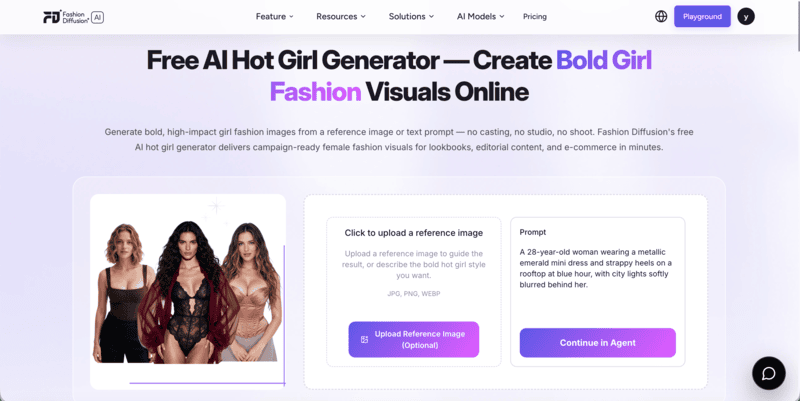
Fashion Diffusion’s AI hot girl generator tool lets you create AI girl photos using text prompts and reference images.

Fashion Diffusion's AI hot girl generator interface.

You can describe the model and scene you have in mind or use a reference image to guide the result. This is useful when you want a particular fashion aesthetic or a more consistent visual direction.

Step 2. Write a Detailed AI Hot Girl Prompt

A good prompt makes a big difference in the final image. Instead of simply typing “beautiful hot girl,” describe the visual elements you want to see.

Consider including these details:

  • Appearance: Age (adult), facial features, hairstyle, and overall look.
  • Outfit: Clothing style, color, fabric, and fit.
  • Pose: Standing, sitting, walking, or looking directly at the camera.
  • Background: A luxury hotel, city street, beach, or studio.
  • Lighting: Soft daylight, direct flash, golden hour, or cinematic lighting.
  • Photography Style: Editorial fashion photography, lifestyle portraits, or Instagram aesthetics.

For example, try this prompt:

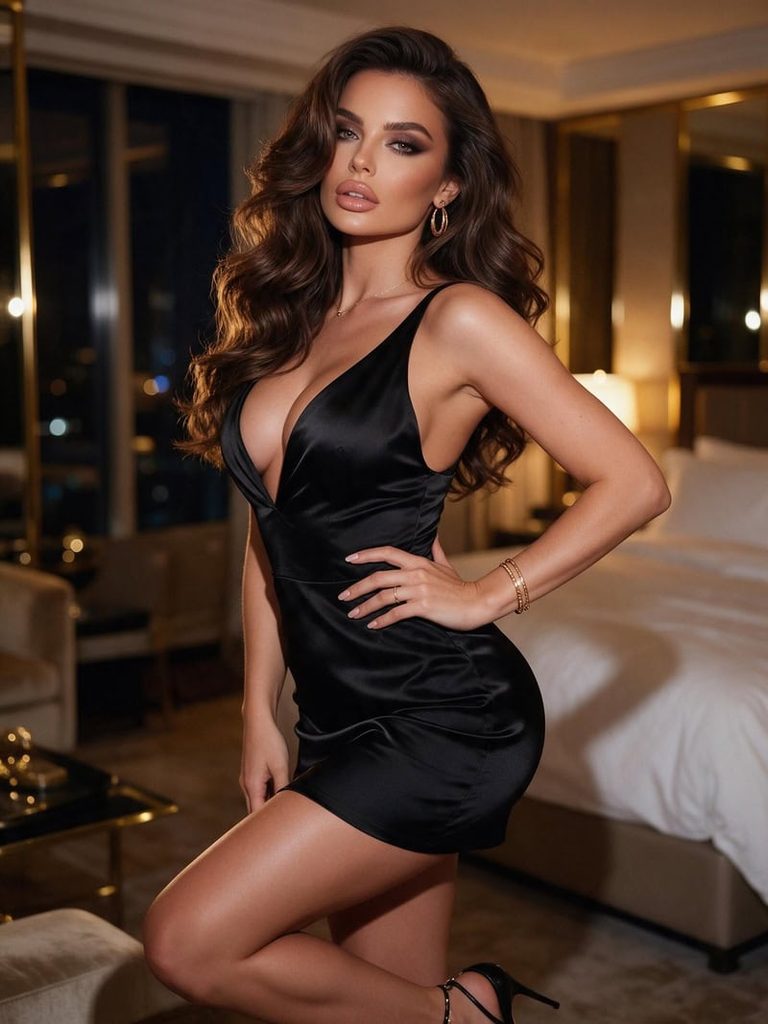
A gorgeous adult European-American woman with long, voluminous brunette waves, defined features, full lips, and a confident, alluring gaze. Wearing a fitted black satin mini dress with a deep neckline, gold jewelry, and elegant heels. Posing with one hand on her hip, body slightly angled toward the camera. Luxurious hotel suite at night, warm golden lighting, soft smoky eye makeup, glossy nude lips. Instagram baddie aesthetic, seductive yet elegant, flattering curves, photorealistic, sharp facial details, high-end glamour photography.

AI hot girl photo example.
Fashion Diffusion AI-generated

The more specific your descriptions are, the easier it is to guide the AI toward your desired result.

Step 3. Generate and Refine Your Image

Enter your prompt and generate the image. Review the result to see whether the outfit, pose, lighting, and background match your idea.

If something looks off, adjust the relevant part of the prompt. For example:

  • Change the outfit from satin to leather.
  • Replace a studio background with a city rooftop.
  • Add softer lighting for a more natural portrait.
  • Adjust the pose for a more relaxed or confident look.

You don’t need to rewrite the entire prompt every time. Small adjustments can help you explore different styles while keeping the overall concept consistent.

How to Edit AI Hot Girl Photos With AI

You don’t always need to generate a new image. If you already have a portrait you like, an AI girl photo editor can help you change its appearance without starting over.

This approach is especially useful when you want to experiment with different fashion styles, upgrade an ordinary selfie, or create a more polished portrait from an existing photo.

Step 1. Upload Your Original Photo

Choose a photo you want to edit. It can be a casual selfie, a full-body portrait, or a simple everyday fashion photo.

For better results, start with an image where the person and the areas you want to edit are clearly visible. Good lighting and a relatively sharp image can also help.

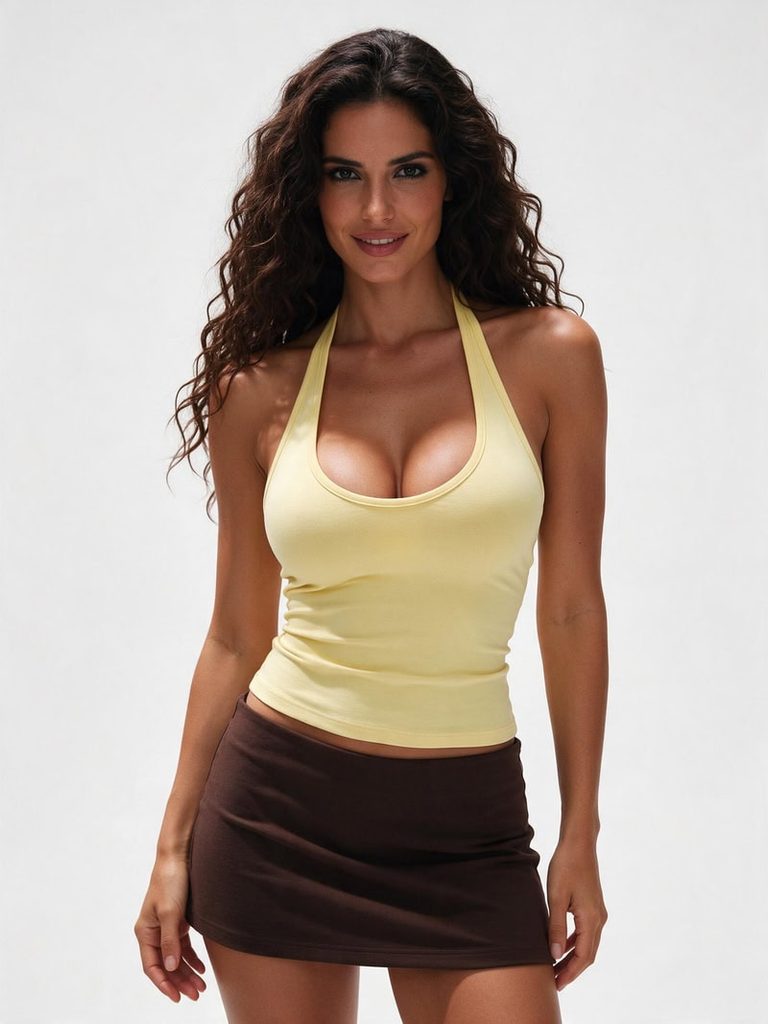
Original hot girl photo.
Fashion Diffusion AI-generated

Open Fashion Diffusion’s AI Inpainting tool and upload your image to get started.

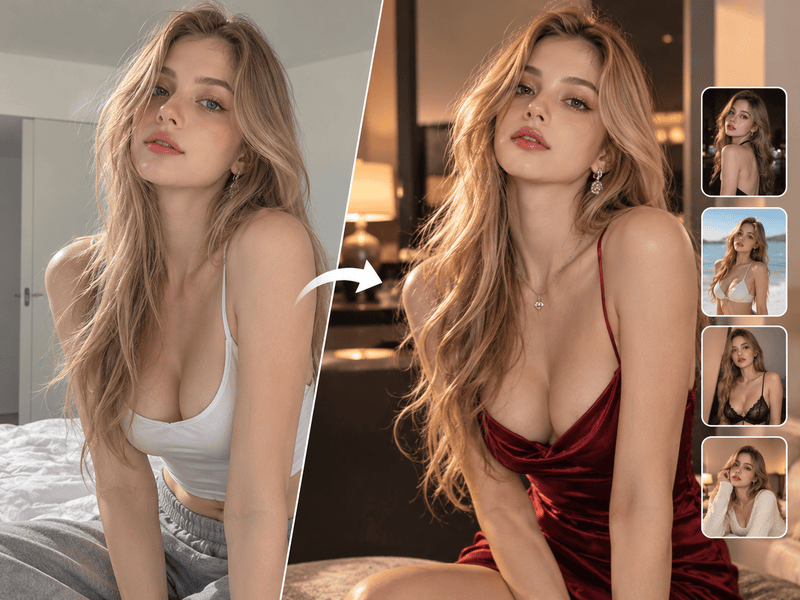
Step 2. Describe the Changes You Want

With AI Inpainting, you can describe the changes you want in natural language. Depending on the edit, you can select a specific area with a mask or provide a prompt to guide the image transformation.

Here are three ways to customize your photo:

Change Your Outfit

Want to replace an ordinary top with a more fashionable look? Describe the new clothing style, fabric, color, and fit.

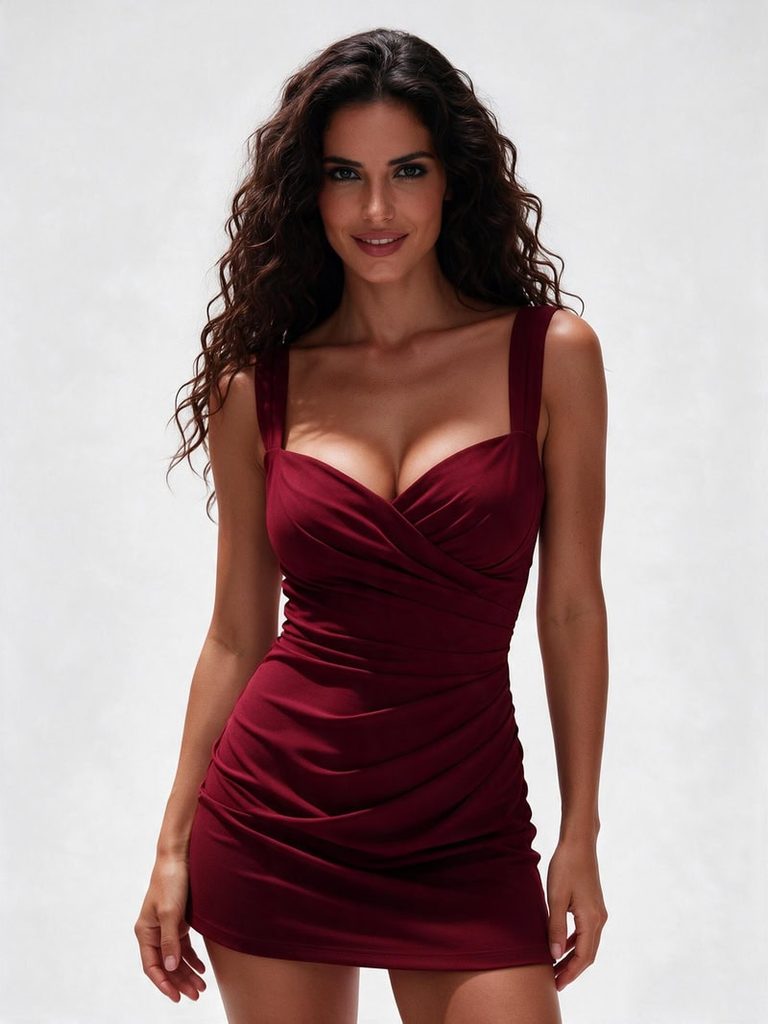
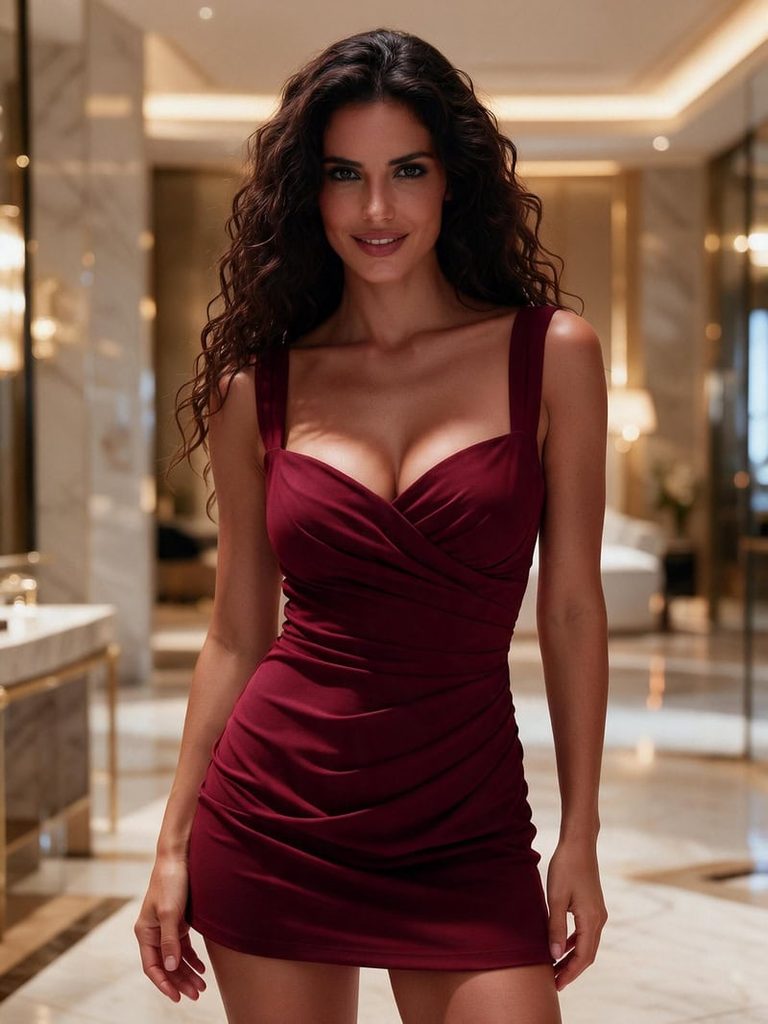
Example prompt: “Replace the casual top with an elegant fitted burgundy dress featuring a subtle sweetheart neckline and delicate draped details. Keep the original body proportions and pose.”

Change the outfit of the AI hot girl photo.
Fashion Diffusion AI-generated

Change the Background

A simple portrait can take on a completely different mood with a new setting.

Example prompt: “Replace the plain indoor background with a luxurious hotel interior featuring warm ambient lighting, marble details, and soft golden tones. Keep the subject unchanged.”

Change the background of the AI hot girl photo.
Fashion Diffusion AI-generated

Change Your Makeup and Hairstyle

Experiment with different beauty looks without changing the entire photo.

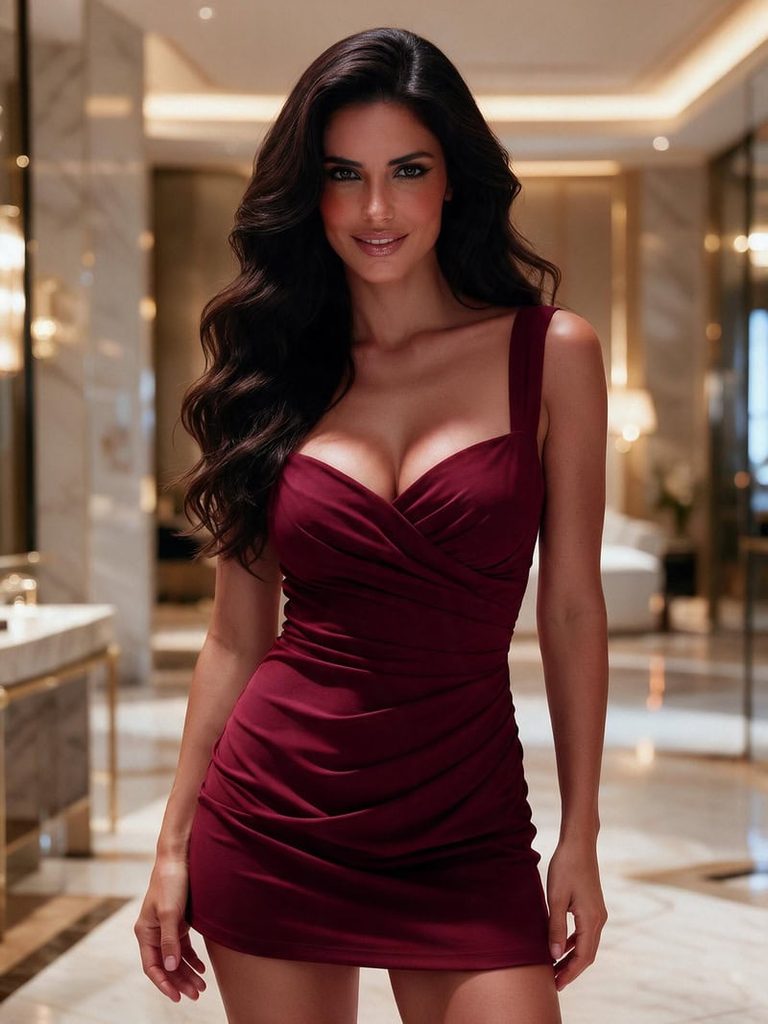
Example prompt: “Add soft glam makeup with defined eyeliner, warm blush, and glossy nude lips. Change the hairstyle to voluminous loose waves while maintaining natural facial features.”

Change the makeup and hairstyle of the AI hot girl photo.
Fashion Diffusion AI-generated

Step 3. Generate and Compare the Results

Once your prompt is ready, generate the edited image and compare it with the original.

Check whether the new outfit fits naturally, the background blends with the subject, and the lighting remains consistent. If one detail doesn’t look right, refine that area with another prompt.

The advantage of AI photo editing is that you can experiment with multiple looks using the same original photo. There’s no need to recreate the entire image for every change.

AI Hot Girl Photo Prompts to Try

Looking for inspiration? Try these AI hot girl prompts featuring different outfits, settings, and Instagram-inspired aesthetics. Copy and customize them to create your own looks.

1. Poolside Bikini Look

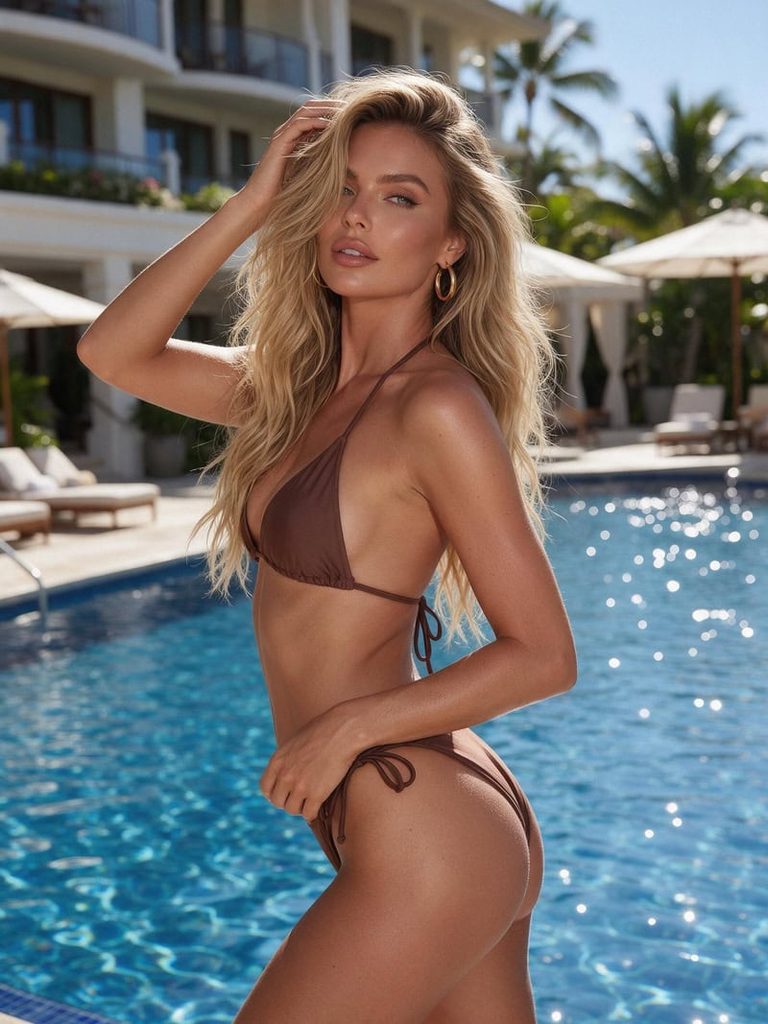
An attractive adult European woman with sun-kissed skin and long blonde beach waves, wearing a stylish chocolate brown bikini and gold hoop earrings. Posing confidently beside a luxury hotel pool, one hand brushing through her hair. Bright summer sunlight, sparkling blue water, tropical resort atmosphere, effortless Instagram model aesthetic, photorealistic fashion photography.

Poolside bikini hot girl look.
Fashion Diffusion AI-generated

2. Luxury Lingerie Look

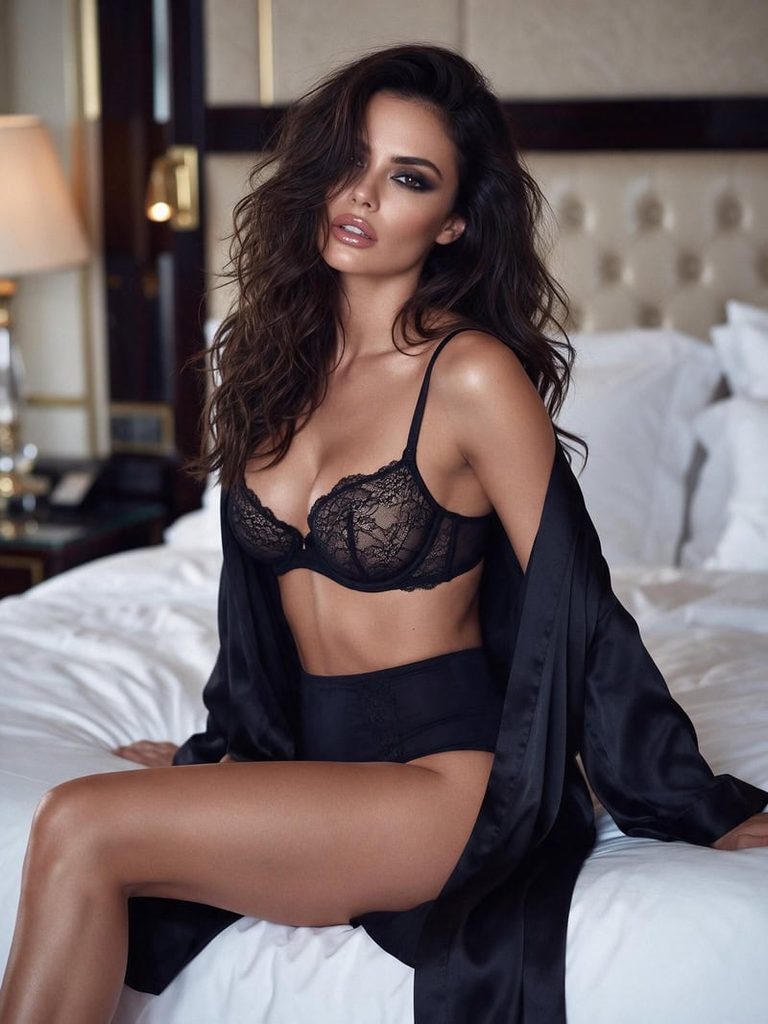
A stunning adult brunette woman with long, tousled waves, wearing a delicate black lace balconette bra, matching high-waisted lingerie bottoms, and an open silk robe. Sitting elegantly on a luxury hotel bed, with one leg slightly extended and a sultry gaze toward the camera. Soft warm lighting, glossy lips, smoky eye makeup, intimate luxury atmosphere, sensual editorial photography.

Luxury lingerie hot girl look.
Fashion Diffusion AI-generated

3. Sexy Instagram Baddie

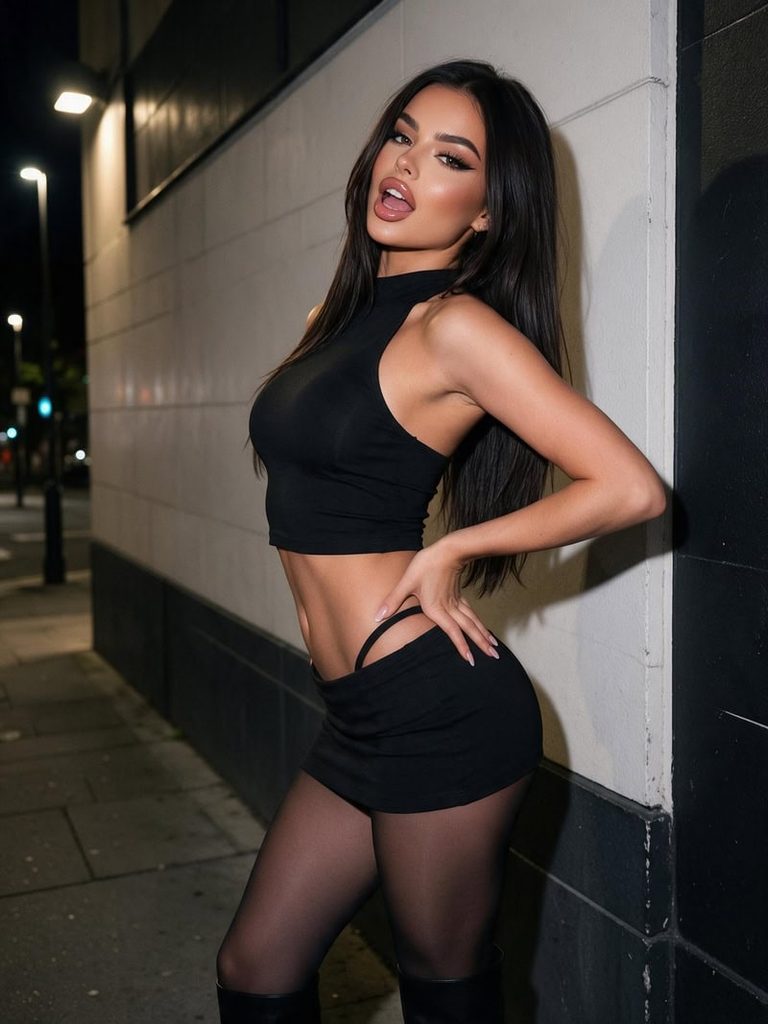
A gorgeous adult European-American woman with long sleek dark hair, wearing a fitted black cropped halter top, ultra-low-rise mini skirt, sheer tights, and knee-high boots. Posing confidently against a stylish city wall, one hand on her hip, with a bold, flirtatious expression. Defined curves, glossy lips, dramatic eyeliner, nighttime street lights, edgy Instagram baddie aesthetic, photorealistic fashion photography.

Sexy instagram baddie.
Fashion Diffusion AI-generated

4. Sunset Rooftop Glamour

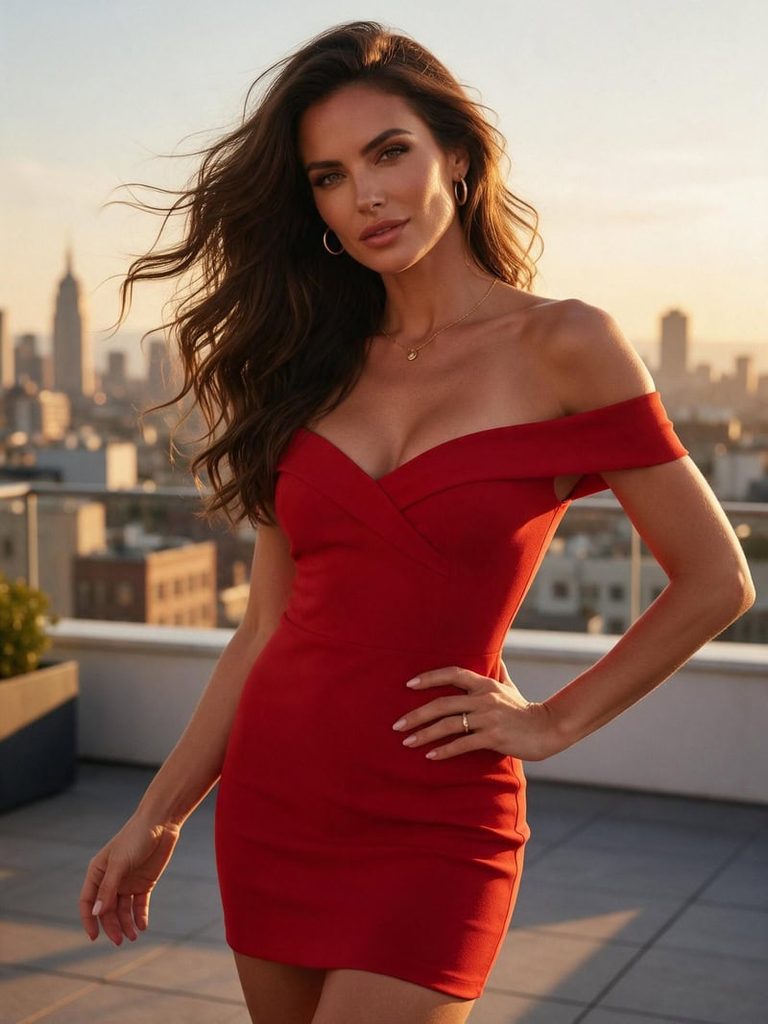
A stunning adult woman with long brunette waves, wearing a figure-hugging red off-shoulder mini dress and delicate gold jewelry. Posing on a rooftop terrace at sunset, with a city skyline in the background. Wind-swept hair, warm golden-hour glow, confident expression, cinematic composition, luxurious Instagram glamour aesthetic.

Sunset rooftop hot girl photo.
Fashion Diffusion AI-generated

Tips for Creating Realistic AI Hot Girl Photos

A good prompt does more than describe appearance. Small details about styling, lighting, and composition can make your AI hot girl photos look more natural and visually appealing.

  • Use Specific Prompts: Describe the outfit, hairstyle, makeup, pose, and setting instead of relying on generic words like “beautiful” or “sexy.”
  • Choose Natural Lighting: Use details like soft daylight, golden-hour sunlight, or warm indoor lighting to create more realistic results.
  • Keep Facial Details Realistic: Include natural skin texture, balanced facial features, and subtle makeup to avoid an overly artificial look.
  • Refine One Detail at a Time: Adjust the outfit, background, pose, or lighting separately to get better results without changing the entire image.

Create Your Own AI Hot Girl Photos With Fashion Diffusion

Creating eye-catching AI hot girl photos doesn’t have to be complicated. Whether you want to generate a new look from scratch or transform an existing portrait, the right prompts and editing tools give you plenty of creative possibilities.

Experiment with different outfits, hairstyles, makeup, and photography styles to find the look you love. You can also explore different visual directions without arranging a new photoshoot for every idea.

Ready to get creative? Visit Fashion Diffusion and discover new ways to create and edit AI fashion photos.

FAQ

How do I edit an existing photo with AI?

Upload your original image to an AI photo editor, describe the changes you want, and generate the edited result. With AI Inpainting, you can target specific areas to change outfits, backgrounds, hairstyles, or other visual details.

How can I make AI girl photos look realistic?

Use detailed prompts that describe natural skin texture, realistic facial proportions, appropriate lighting, and believable poses. Avoid excessive beauty filters or overly complicated descriptions that may produce unnatural results.

Can I change outfits and backgrounds in AI hot girl photos?

Yes. AI photo editing tools can replace clothing and backgrounds based on your text instructions. You can describe a new outfit, location, lighting setup, or overall photography style to transform an existing portrait.

Do I need a reference photo to create AI hot girl images?

No. You can generate images entirely from text prompts. However, using a reference photo can help guide the model’s appearance, pose, or overall visual direction when you want a more specific result.

Can I create AI hot girl photos for free?

Yes. Some AI image generators offer free credits or limited free generations. Fashion Diffusion provides free credits for new users, so you can try creating AI hot girl photos before choosing a paid plan.